
1. Getting started
Electronics / AC / Appliances is GST billing, stock and accounts software made for gst billing for electronics, ac & appliance showrooms. It runs on your own website (hosting) or on your own Windows computer - your business data stays with you. Made for this business: Serial / IMEI, AC indoor-outdoor pairs, brand & model, warranty months.
- You need: a licence (bought on ajonbill.com), and either hosting with PHP 8.1+ and MySQL / MariaDB, or a Windows 10 / 11 computer.
- Two parts: your ajonbill.com account (licence, downloads, add-ons, renewals, support) and your billing software (bills, stock, accounts).
- Keep this manual open in another tab - every chapter is step by step with real screens.
2. Buy a licence & your account
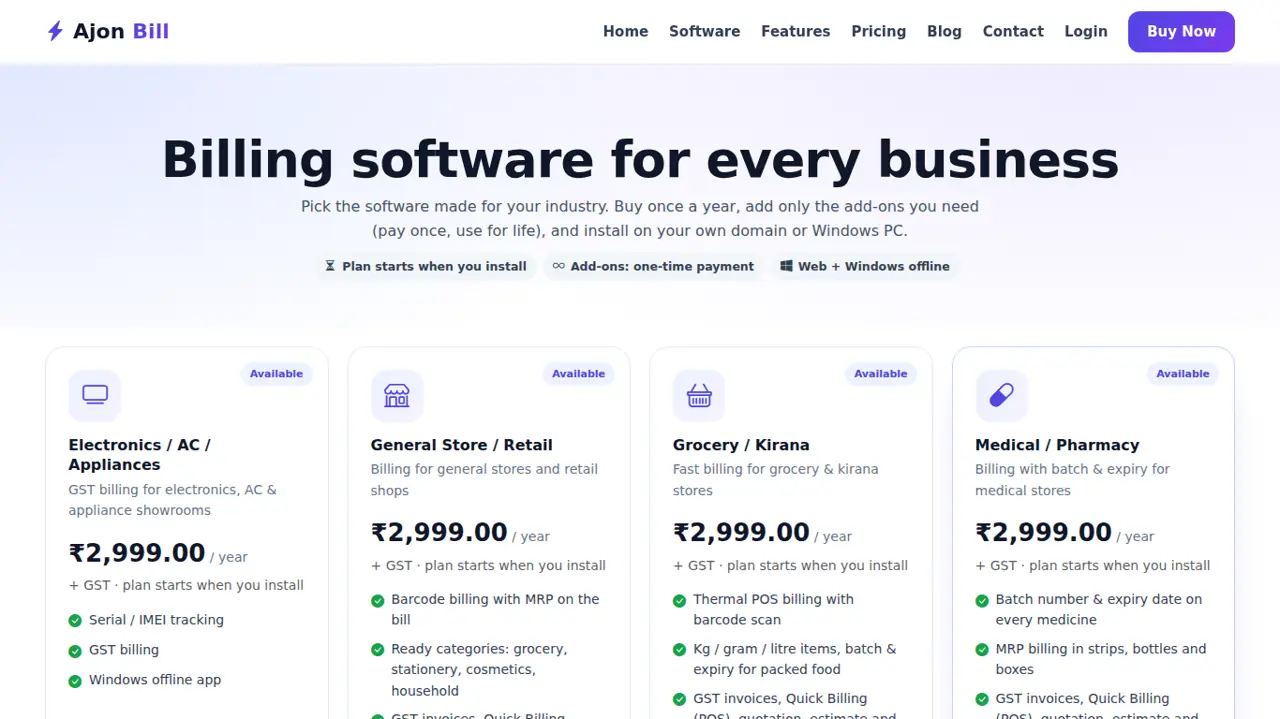
- Open www.ajonbill.com → Software, choose Electronics / AC / Appliances and click Buy now.
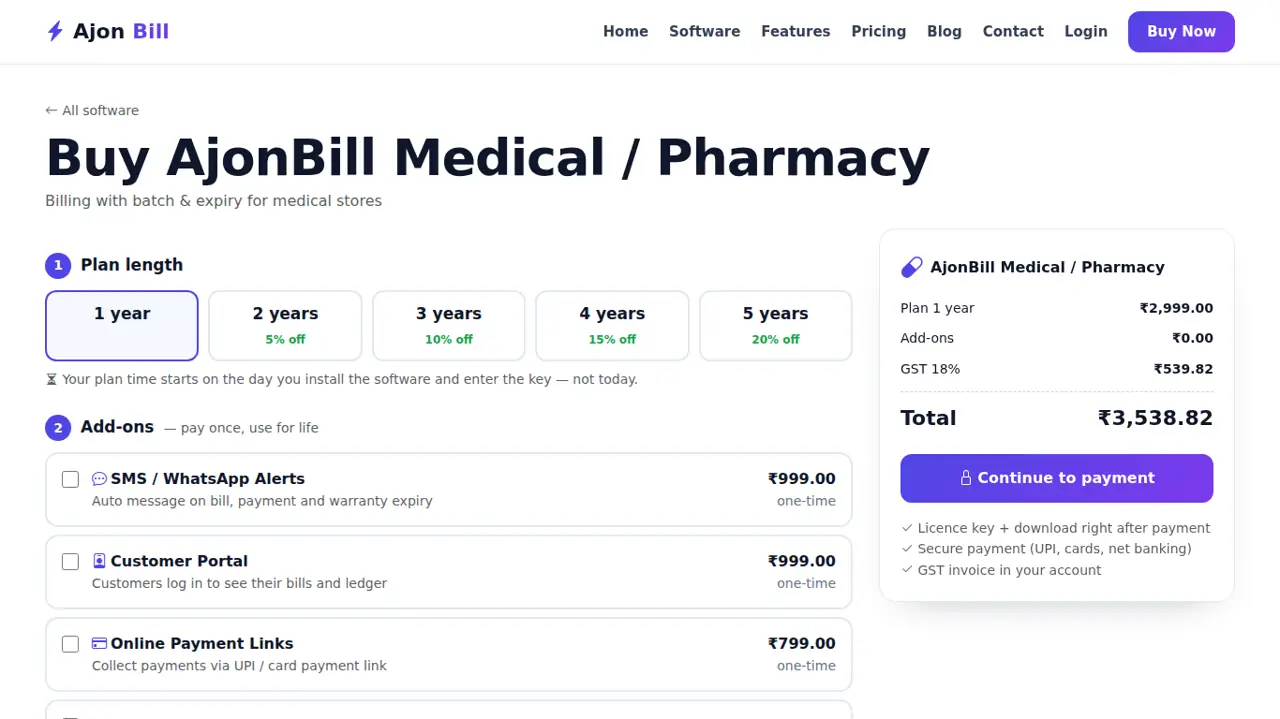
- Choose the years, tick any add-ons you want now (you can add them later too) and pay online.
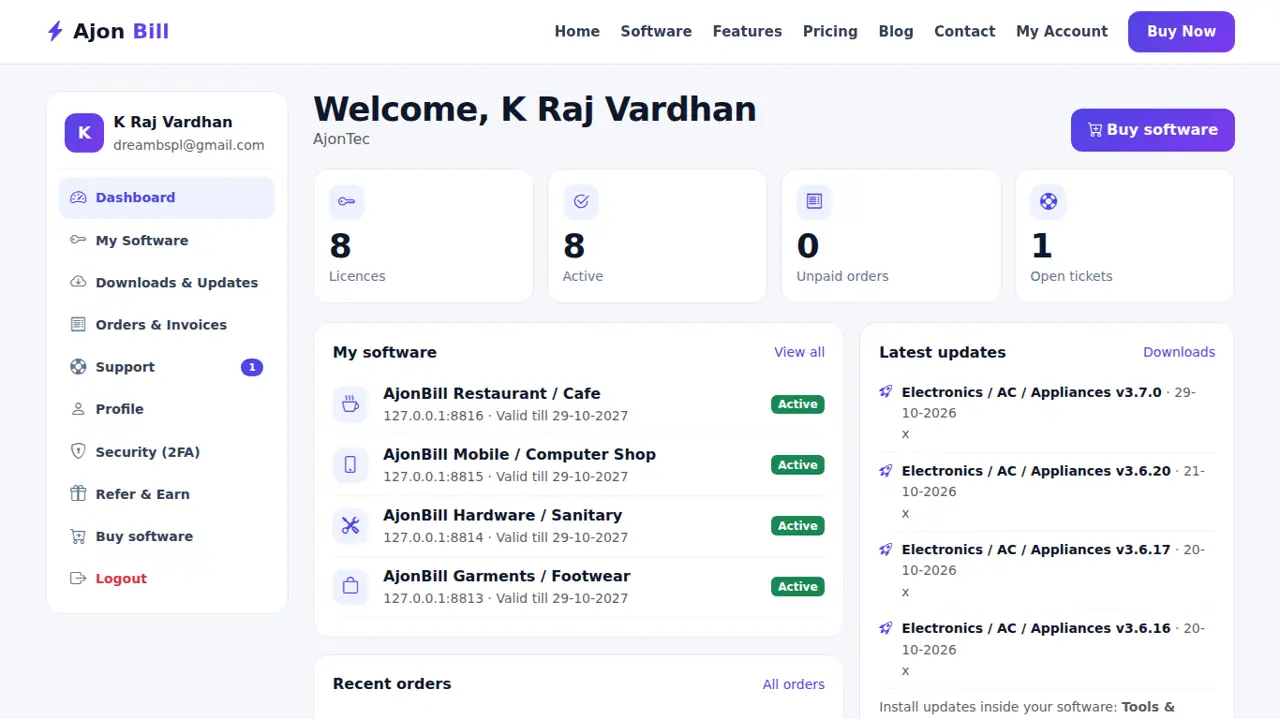
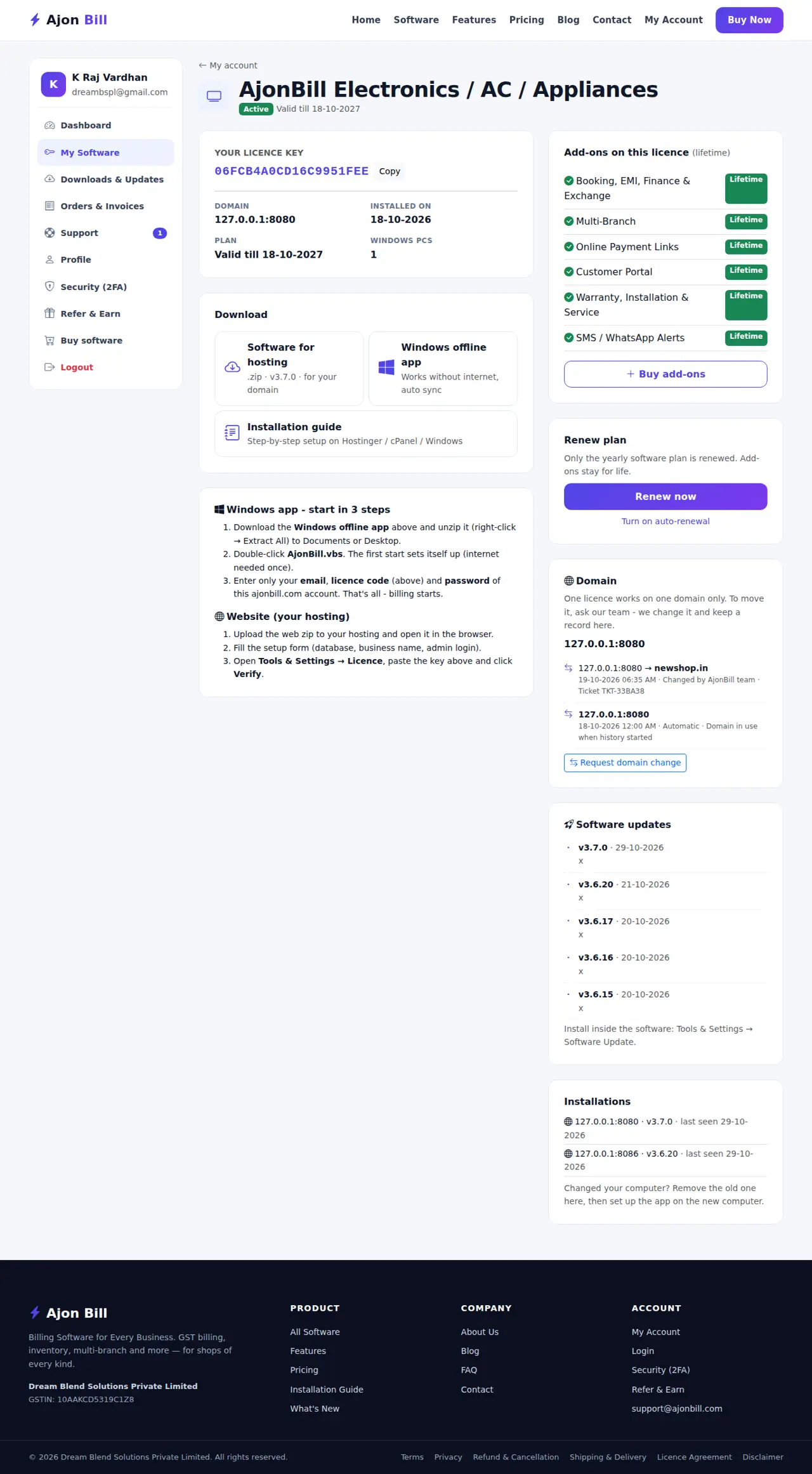
- Your licence code and downloads appear at once in My Account → My Software and are emailed to you.
- Your plan starts on the day you install, not on the day you pay.
3. Install on your hosting (website)
3.1 Make a database (Hostinger / cPanel / CloudPanel)
- Log in to your hosting panel → Databases (Hostinger: Websites → Manage → Databases → MySQL Databases; cPanel: MySQL Database Wizard; CloudPanel: Sites → your site → Databases → Add Database).
- Create a database, a user and a strong password. Write the database name, user, password and host (usually
localhost).
3.2 Upload the software
- In My Account → My Software download the website package (zip).
- Hosting panel → File Manager → open
public_html(CloudPanel:htdocs/your-domain) → Upload the zip → Extract it there. - Make sure the
storagefolder is writable (permission 775). - Turn on SSL (https) for your domain in the hosting panel.
3.3 Run the installer
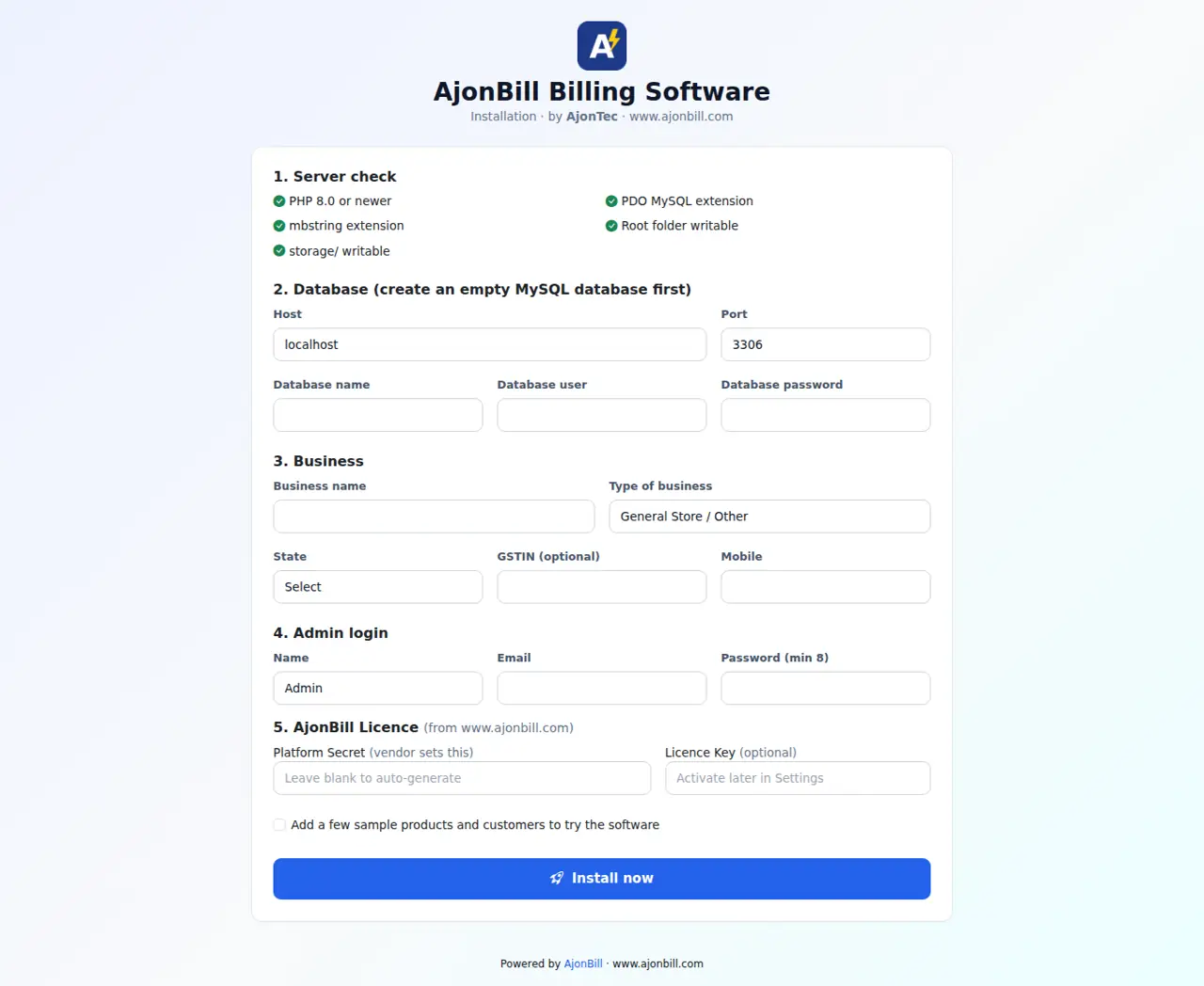
- Open your domain in the browser - the installer opens.
- Fill the database details, your business name, state, GSTIN (optional), the admin login and your licence code.
- Click Install. The software checks the licence, creates everything and opens the login page.
4. Windows offline app
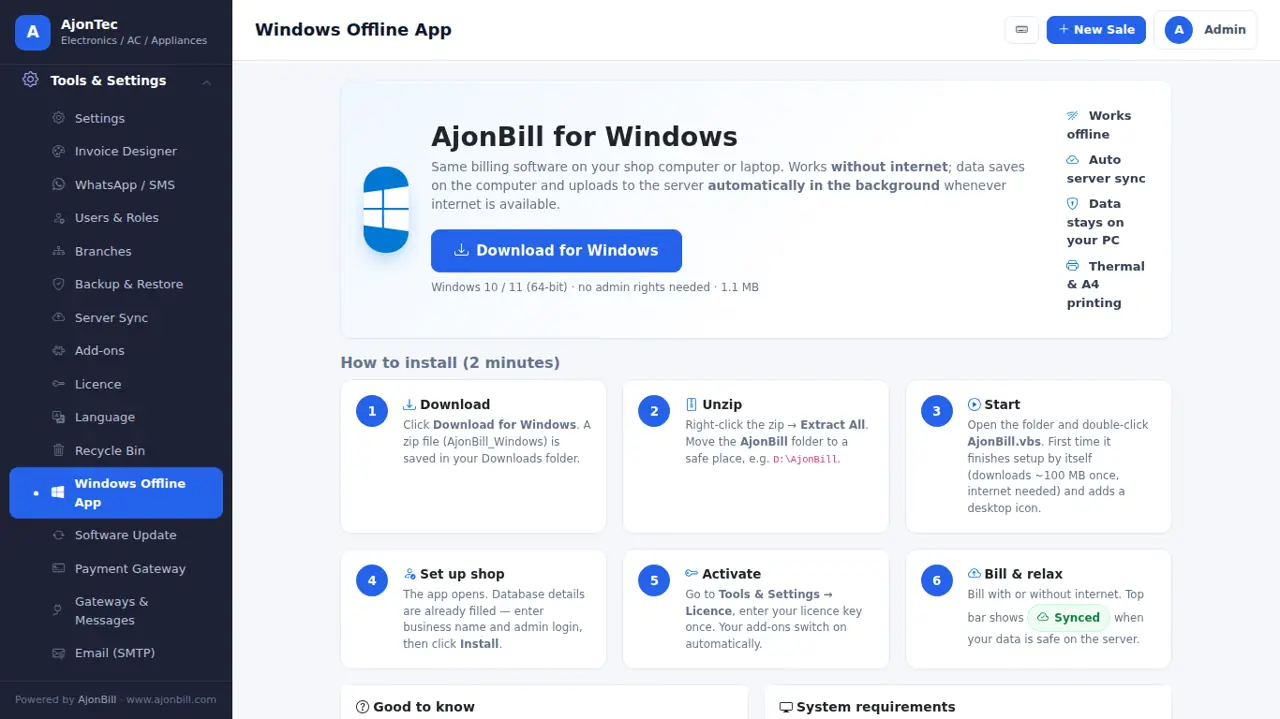
- My Account → My Software → download the Windows offline app → right-click → Extract All to Documents or Desktop.
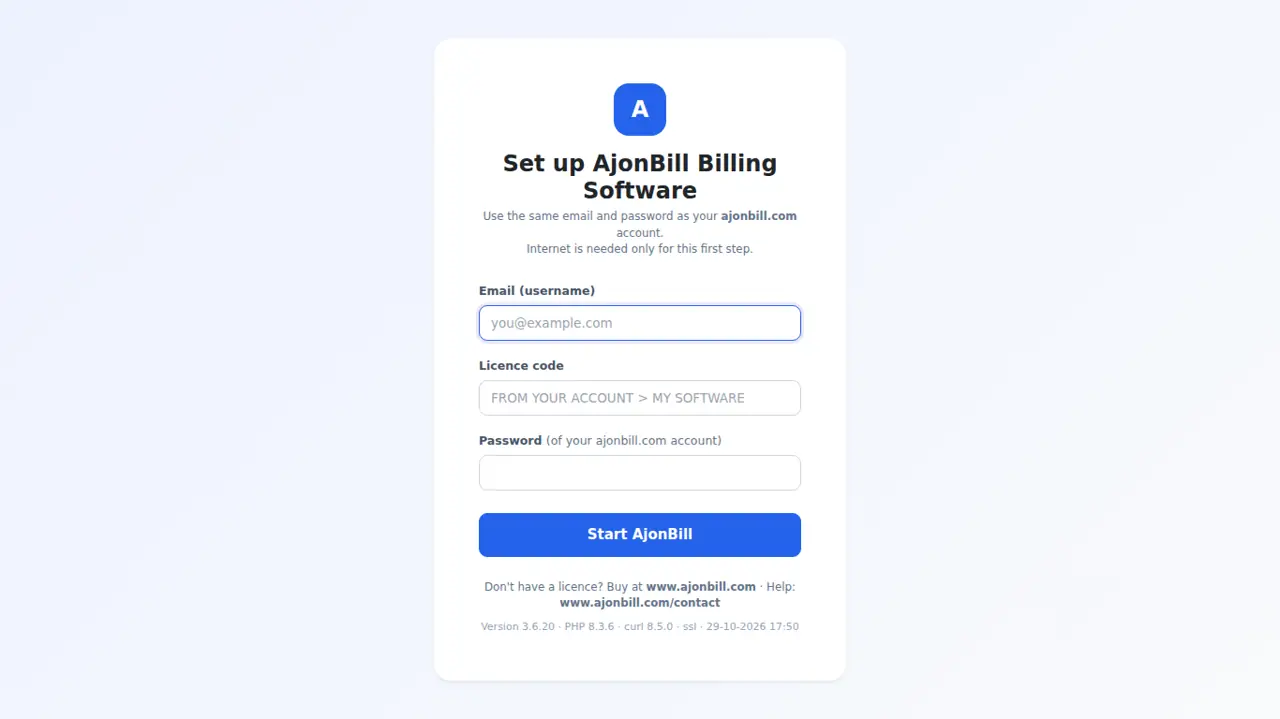
- Double-click AjonBill.vbs. The first start downloads PHP and the local database by itself (internet needed once, about 100 MB) and makes a desktop icon.
- Enter only your ajonbill.com email, licence code and password. No password yet, or forgotten? Click Email me a code - the password you typed becomes your account password.
- If you already use the website copy, every bill, product and customer comes to the computer and bill numbers continue.
- Works without internet for up to 90 days; data uploads to the server by itself when internet returns.
- Bring the website data again any time: Backup & Restore → Bring my data from website.
- New computer: My Account → My Software → Installations → Remove the old one, then set up the new one.
- Close fully with Stop-AjonBill.bat.
5. Login & dashboard
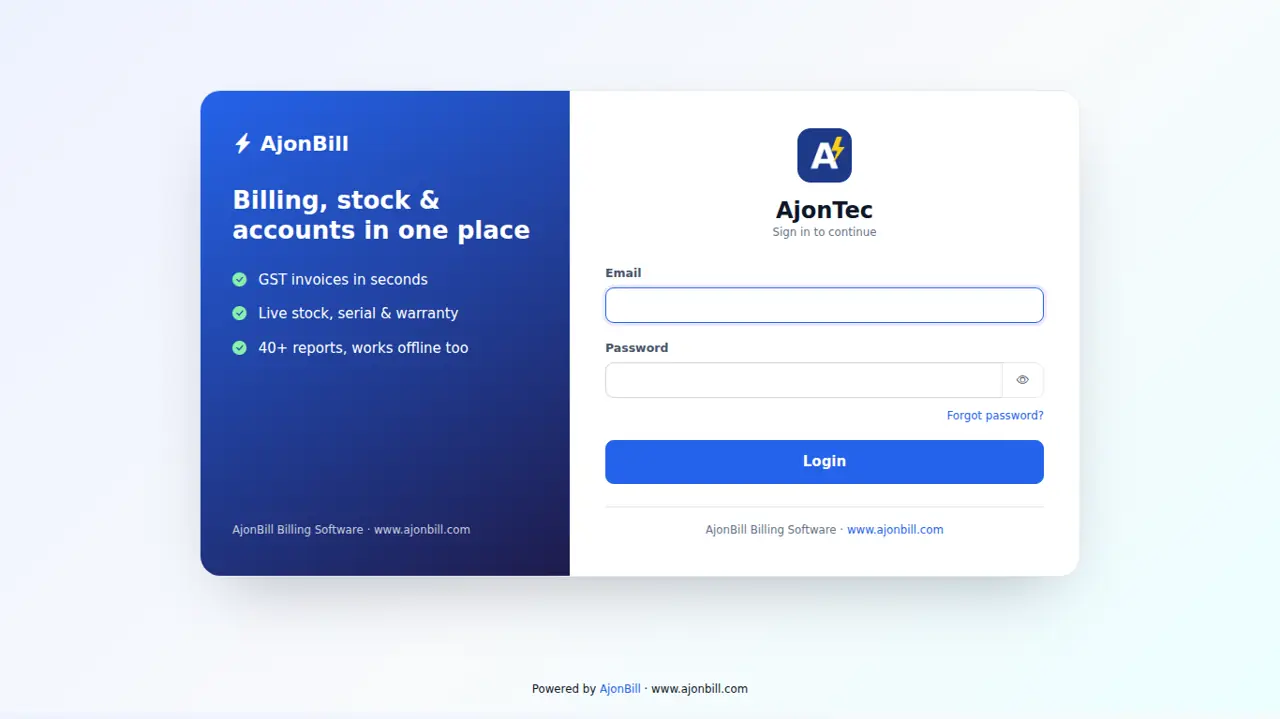
- Open your domain (or the desktop icon) → enter your email and password → Login. Turn on two-step login in Profile for extra safety.
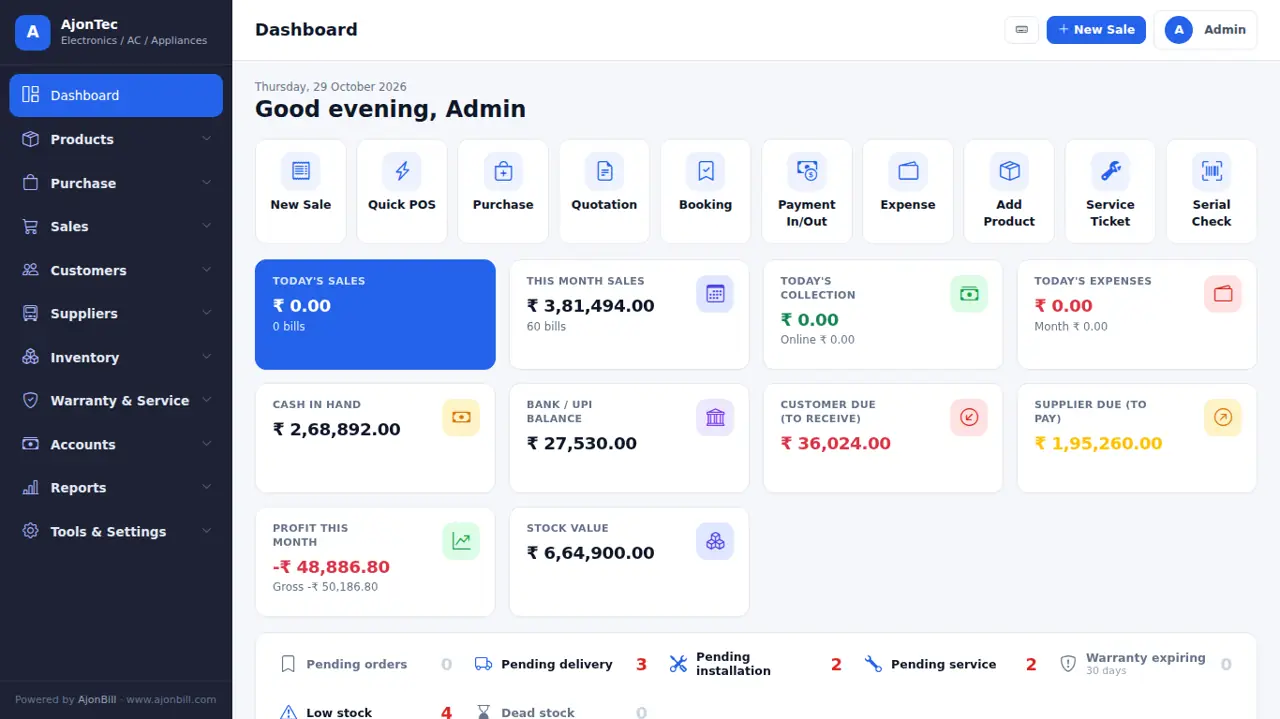
- The Dashboard shows today's sales, money received, customer dues, supplier dues, low stock and quick buttons.
6. Products & stock
6.1 Add a product
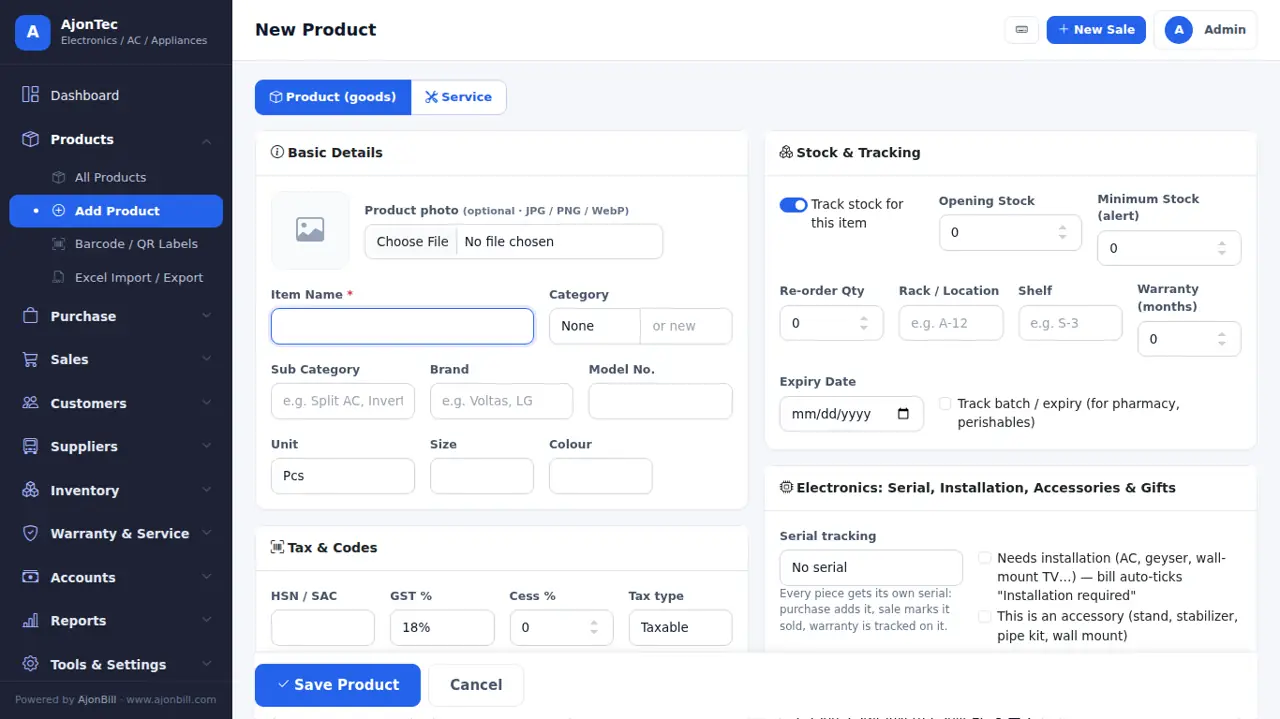
- Products → Add Product.
- Item name, category (pick or type a new one), unit, HSN and GST %.
- Prices: purchase, sale (retail), wholesale, dealer, offer and MRP. Tick Rates include GST if your prices already have GST.
- Stock: opening stock, minimum stock (low-stock alert), rack / shelf. Turn off Track stock for services or dishes.
- Optional: photo, barcode / SKU, brand & model and the business fields (see chapter 25).
- Save.
6.2 Change stock
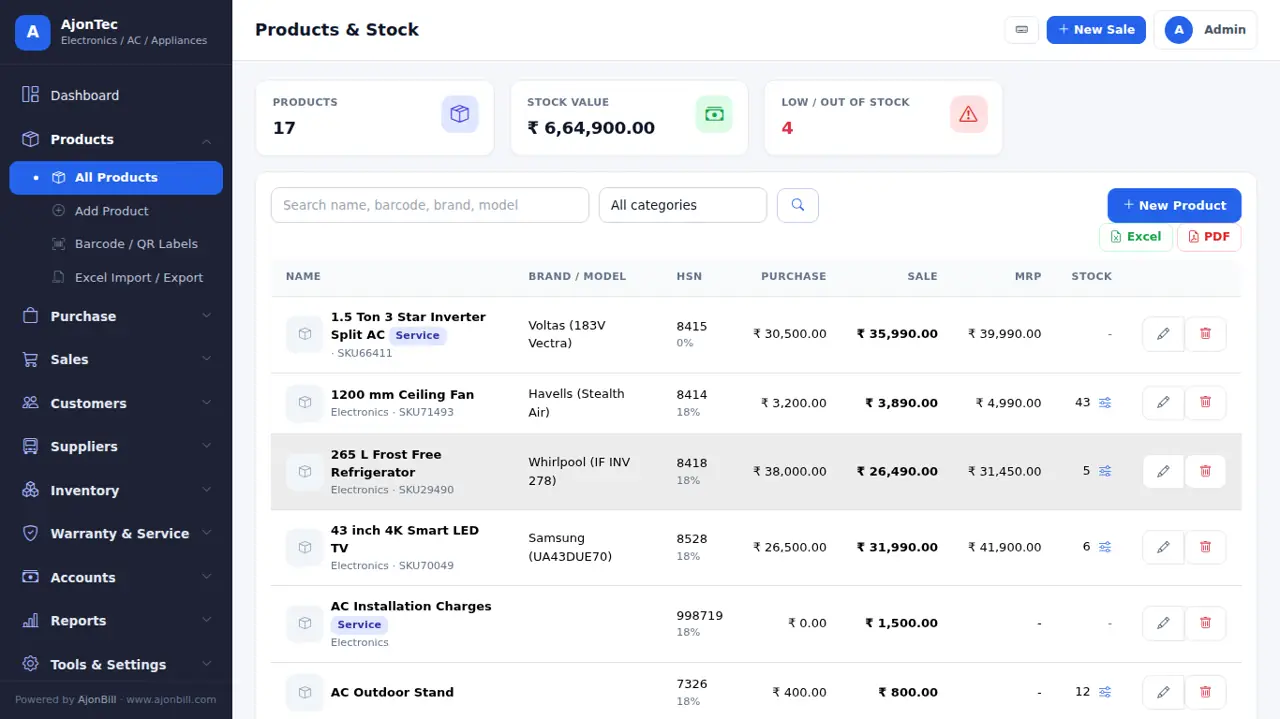
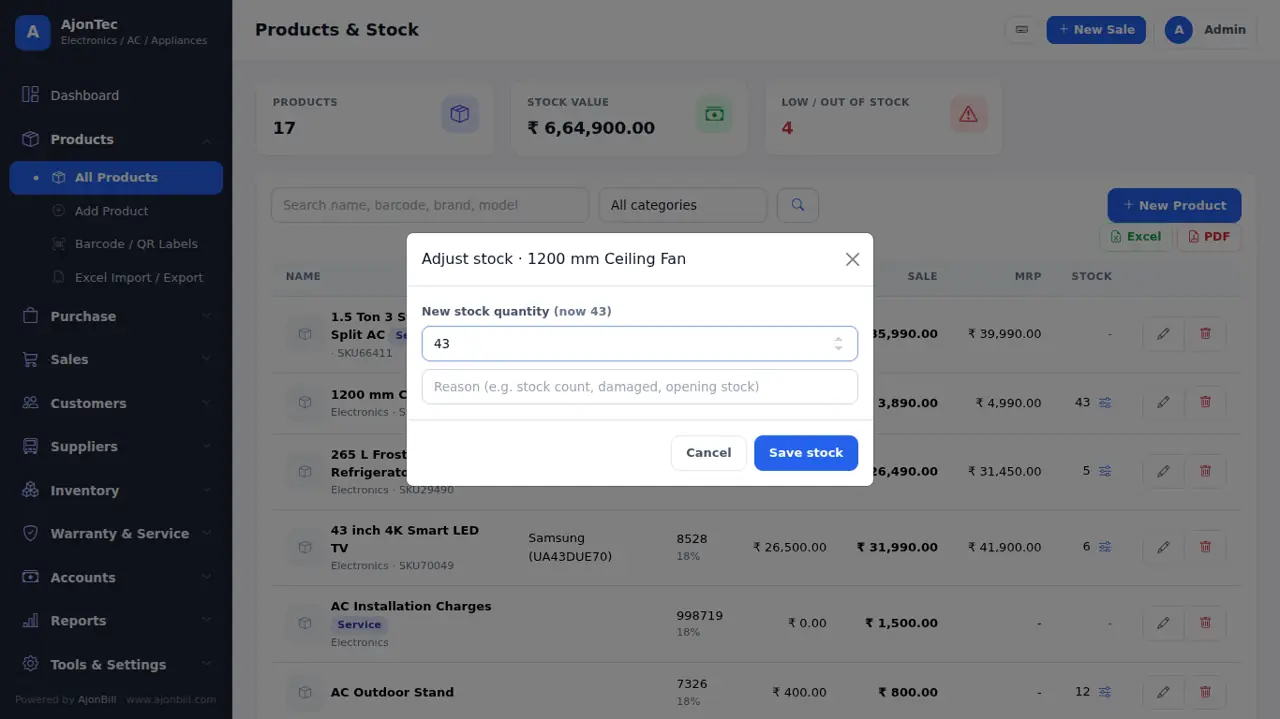
Click the slider icon next to the stock → type the new quantity and a reason → Save stock. Every change is kept in the stock history.
6.3 Barcode labels, Excel import and live stock
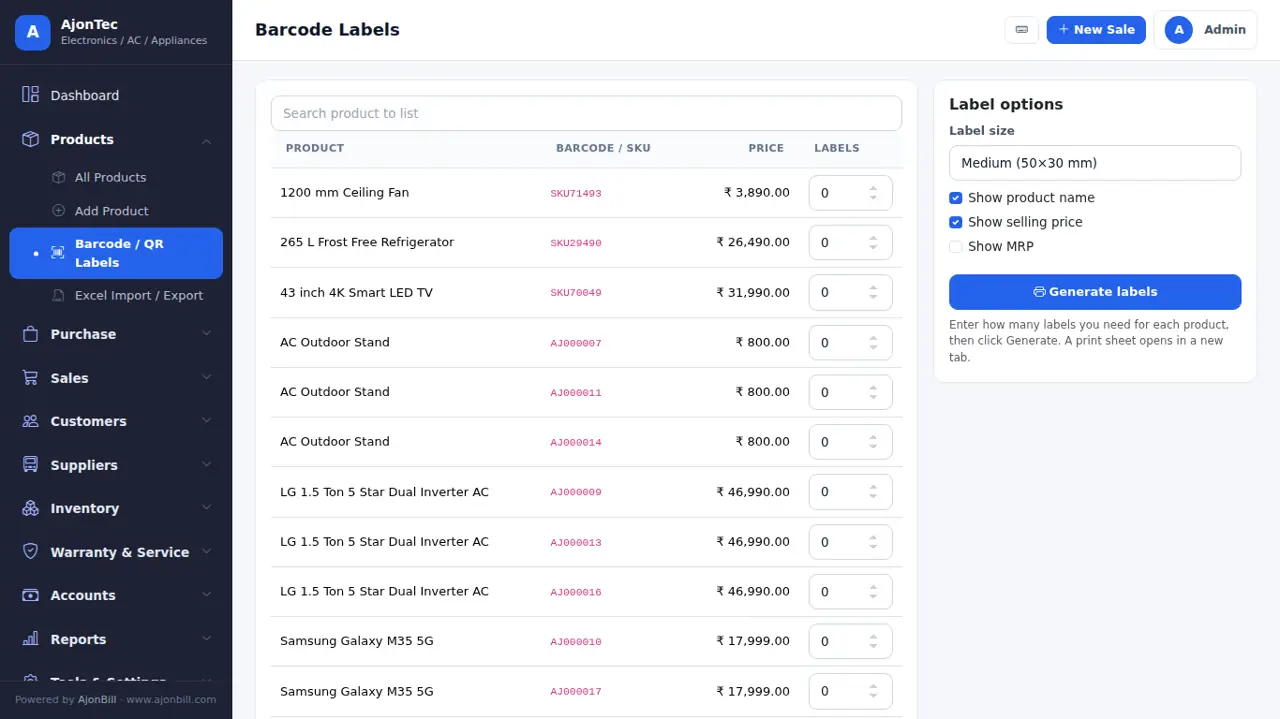
- Products → Barcode / QR Labels: choose items and copies → print on A4 sheets or a label printer.
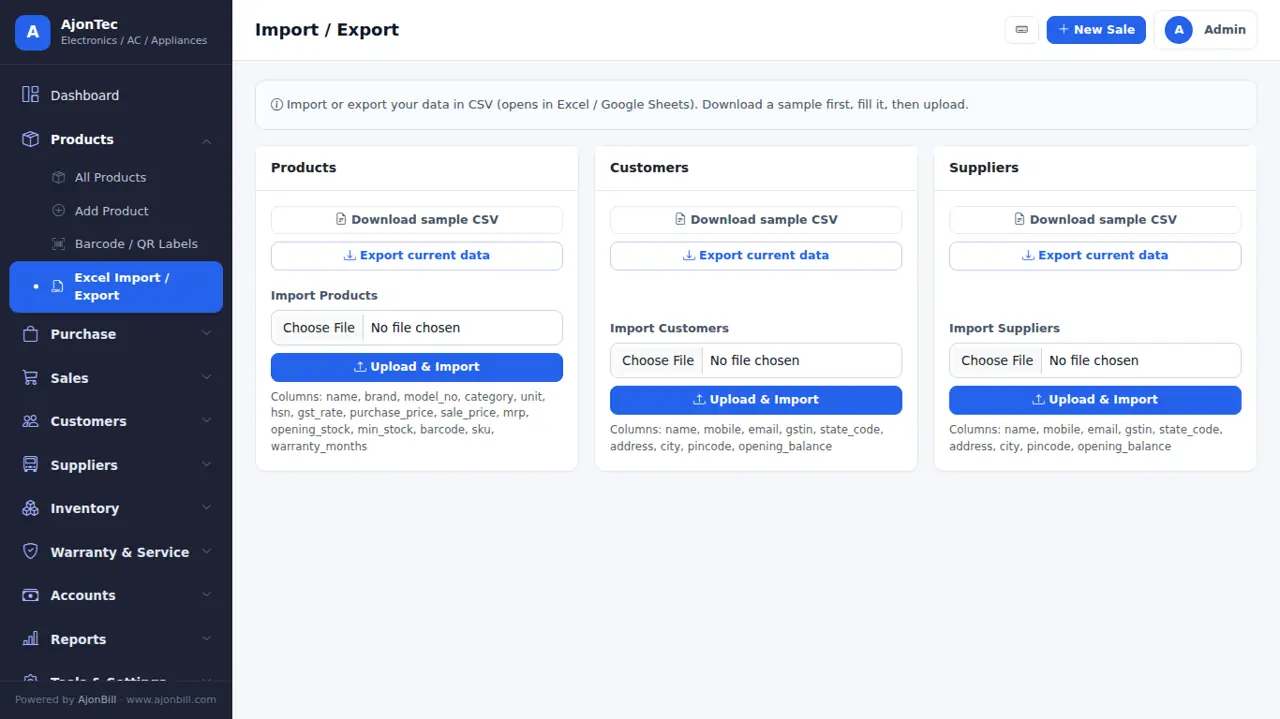
- Products → Excel Import / Export: download the sample file, fill it, upload. Existing items are updated, new ones are added.
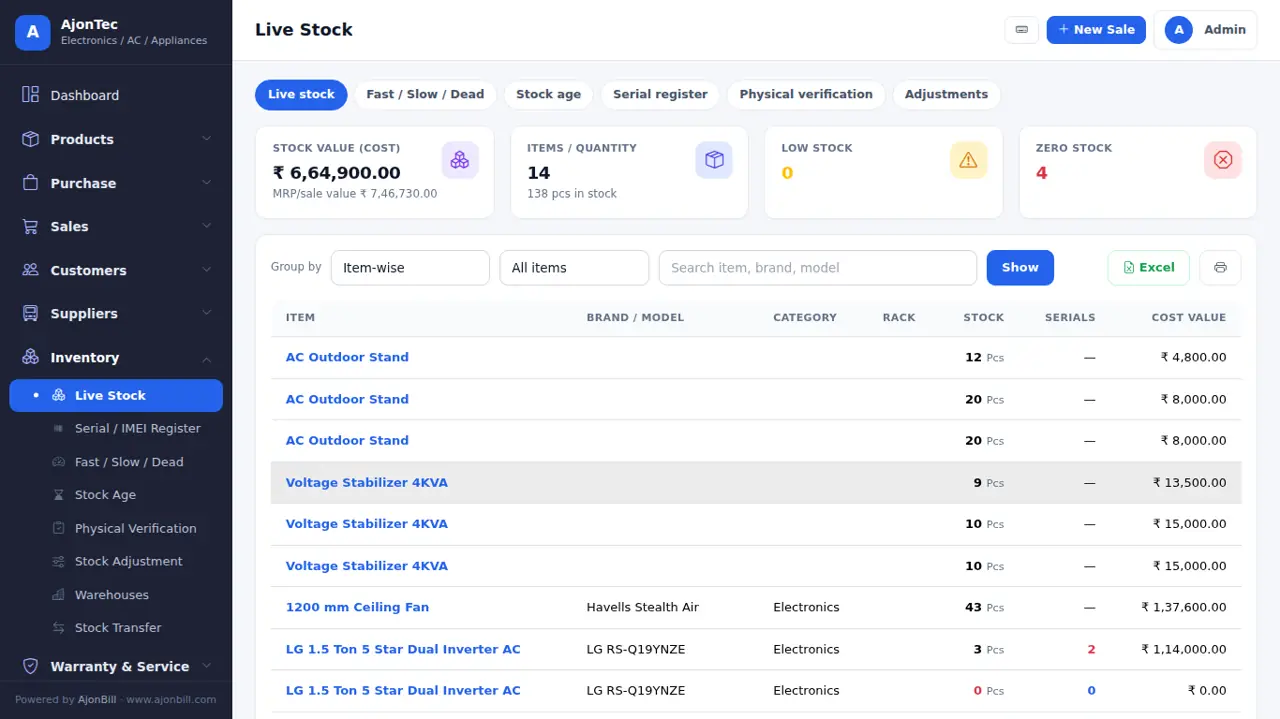
- Inventory → Live Stock: stock and value branch-wise, low and dead stock.
7. Purchase (stock in)
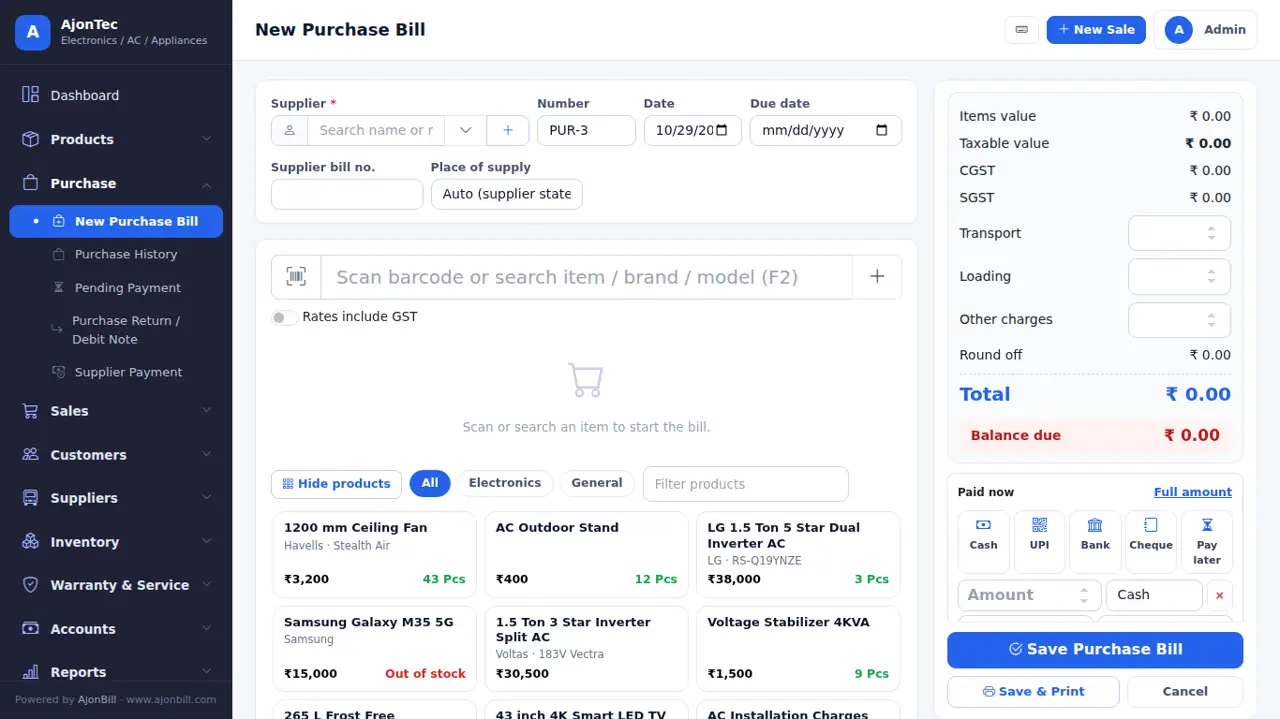
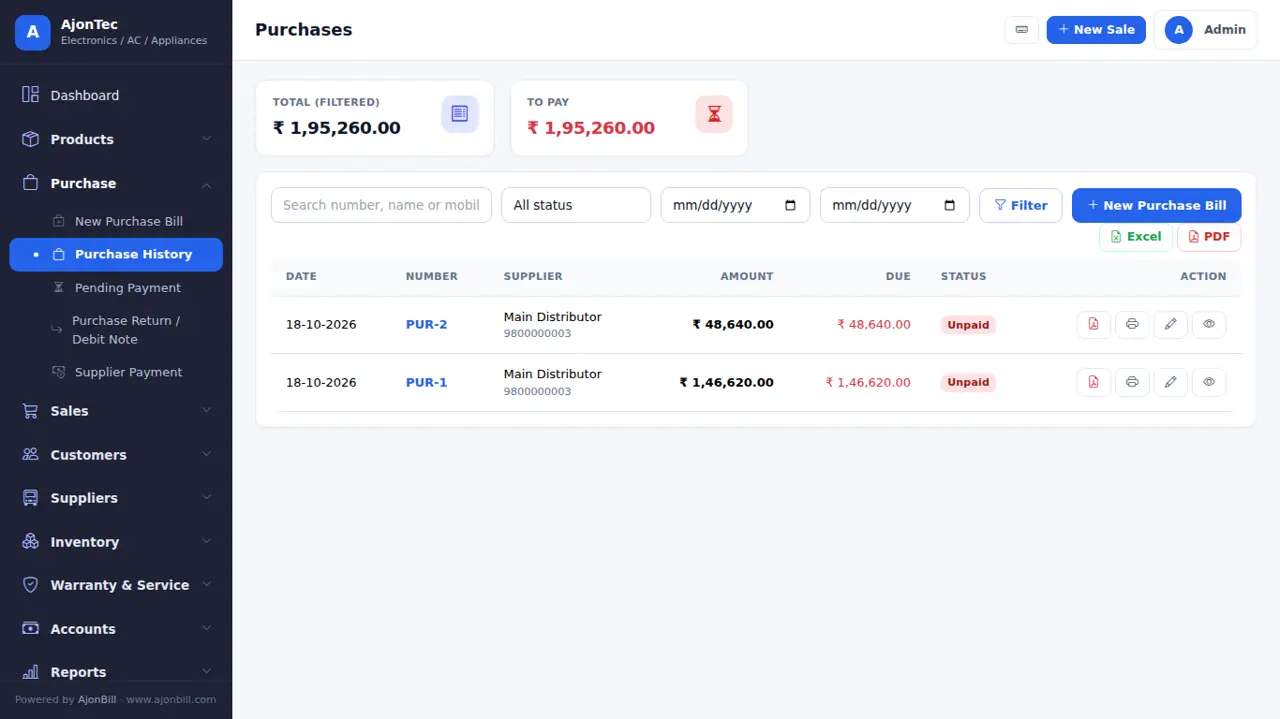
- Purchase → New Purchase.
- Pick the supplier (or + to add), the supplier bill number and date.
- Add items: search or scan, quantity, purchase rate, GST. Serial / IMEI or batch & expiry where needed.
- Add transport / loading charges if any, then the amount paid now (cash, UPI, bank...).
- Save - stock goes up and the supplier balance updates.
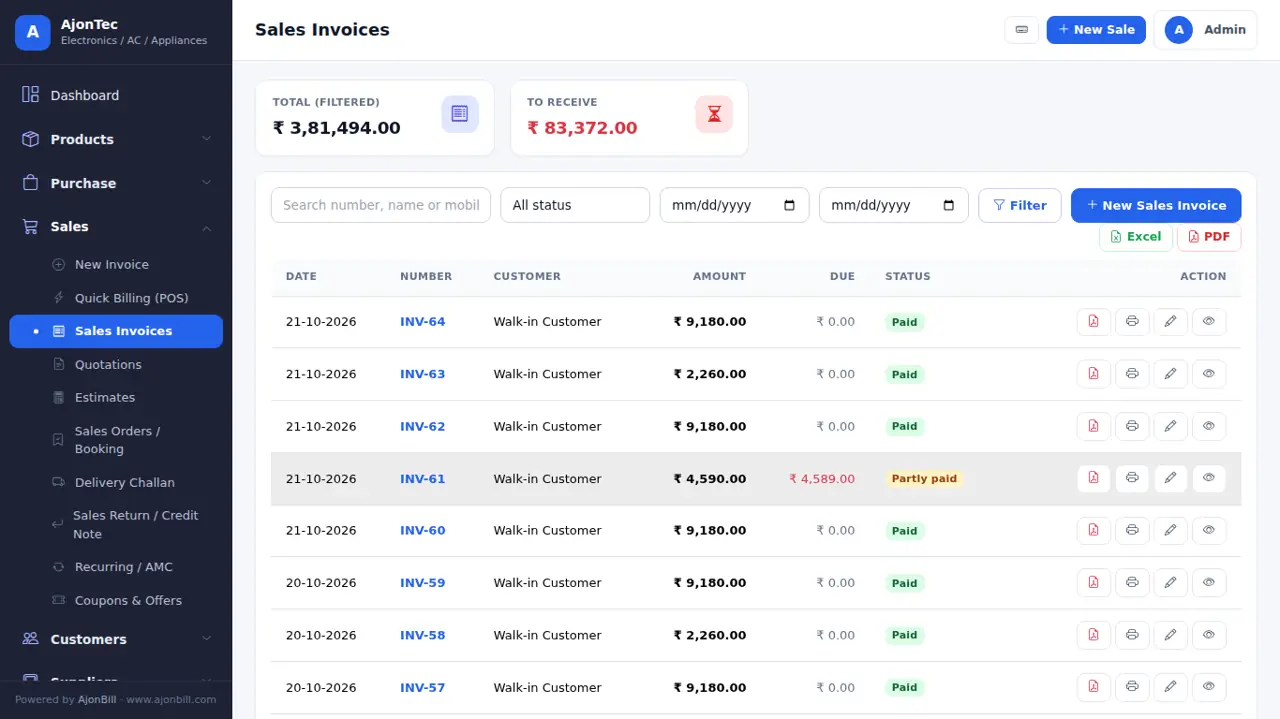
8. Sales invoice
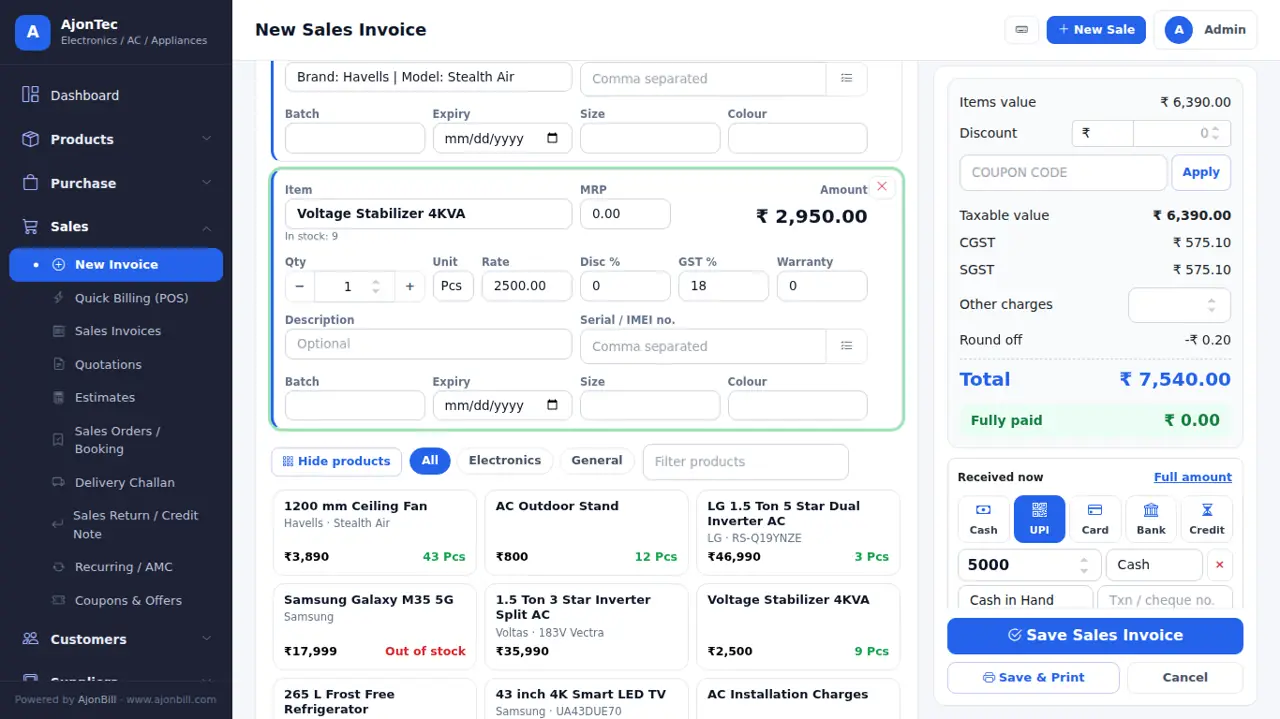
- Sales → New Invoice (or the blue New Sale button).
- Customer: Walk-in Customer is ready; click the box or ▾ to pick, or + to add a new customer. Old dues show under the name.
- Bill format, salesman, place of supply, GST / Non-GST and sale type (Cash / Credit; EMI, Finance and Exchange with the add-on).
- Add items: scan, type in the search (F2) or tap a product tile. Each item has 3 lines: name & amount · qty − / +, unit, rate, discount %, GST %, warranty · description and serial / IMEI.
- An item with no stock shows a warning and is not added (unless Allow negative stock is on in Settings).
- Discount: ₹ amount (exactly that much comes off the total) or %; coupon codes work too.
- Received now: tap Cash / UPI / Card / Bank; for a split payment type the first amount, then tap the next mode - the balance goes there. Balance due is shown under the total.
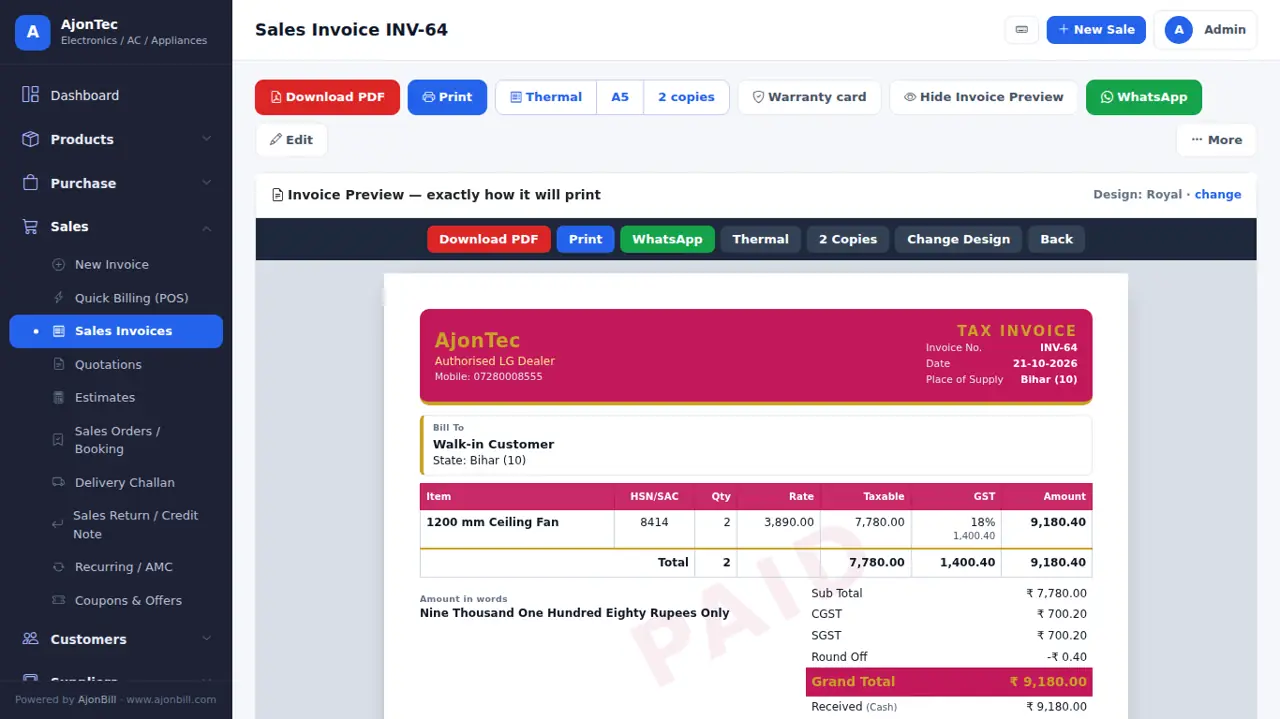
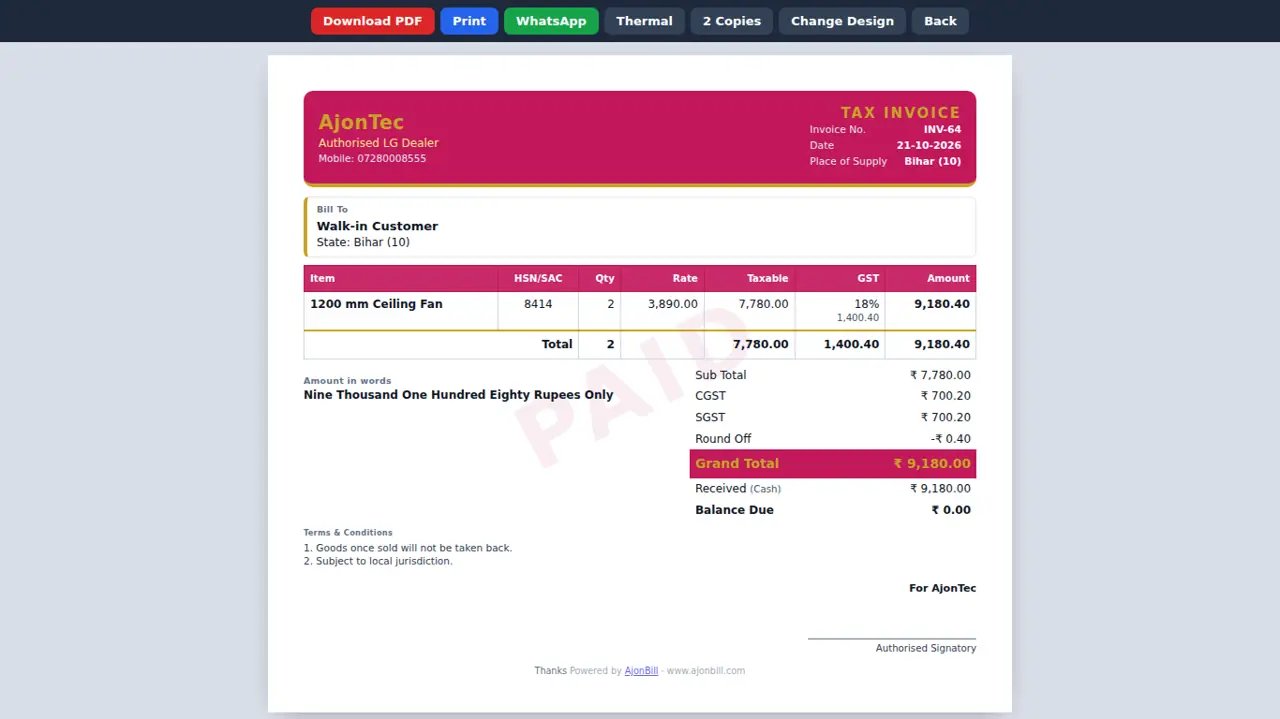
- Save or Save & Print. The bill opens in your invoice design - print, PDF, WhatsApp or thermal.
9. Quick Billing (POS)
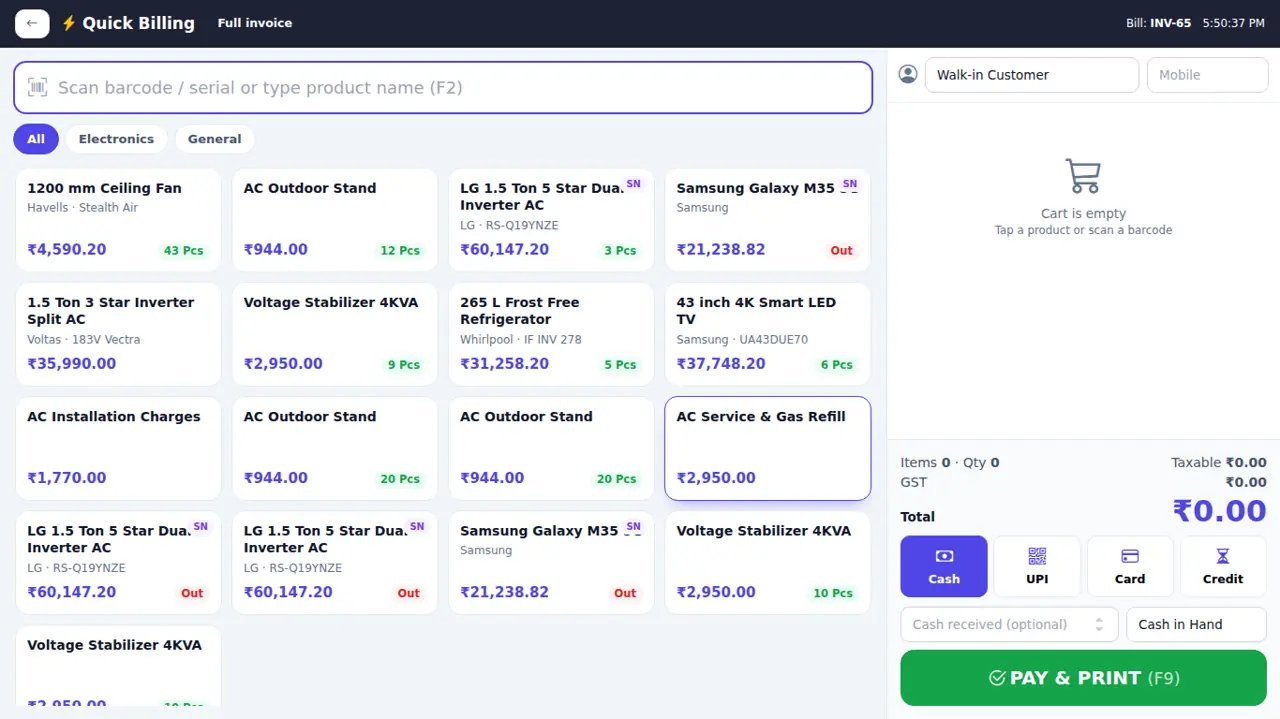
- Sales → Quick Billing (POS).
- Tap tiles or scan barcodes; change qty with − / +.
- Choose the payment mode, type the amount received - the change to return is shown.
- Pay & print - prints on the thermal printer.
10. Quotation, estimate, delivery challan and sales order
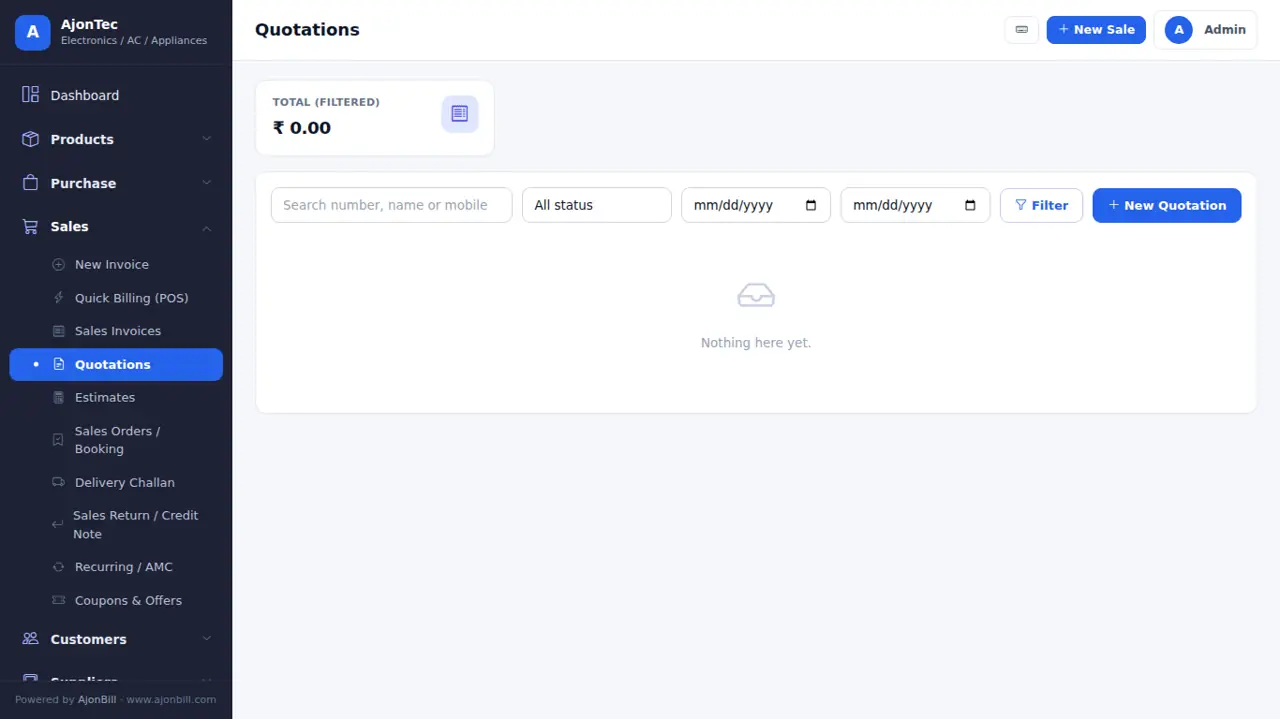
- Quotations / Estimates: same screen as the invoice; stock does not change. Convert to an invoice in one click.
- Delivery Challan: goods leave without a tax invoice; convert to an invoice later.
- Sales Orders / Booking (add-on): take an advance now, deliver and bill later.
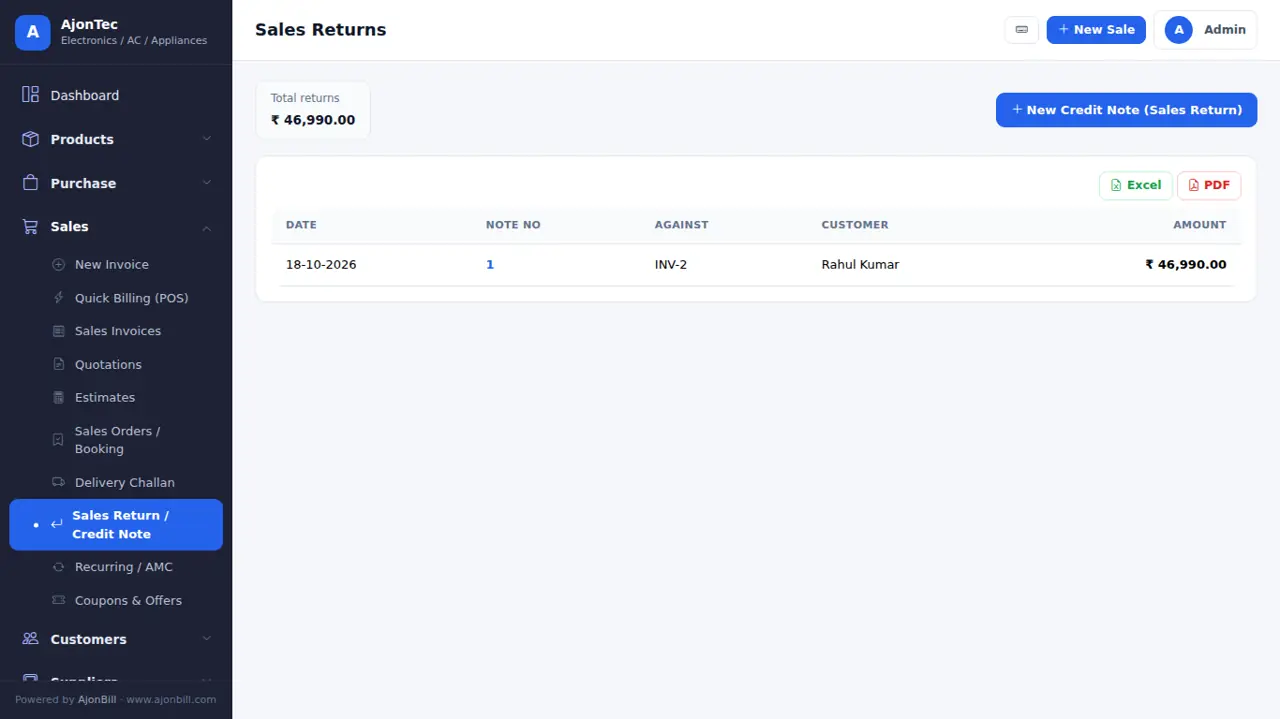
11. Returns (credit / debit notes)
- Sales → Sales Return / Credit Note → pick the invoice → choose items and qty → refund or keep as credit.
- Stock comes back and the customer balance updates. Purchase returns work the same from Purchase.
12. Customers & suppliers
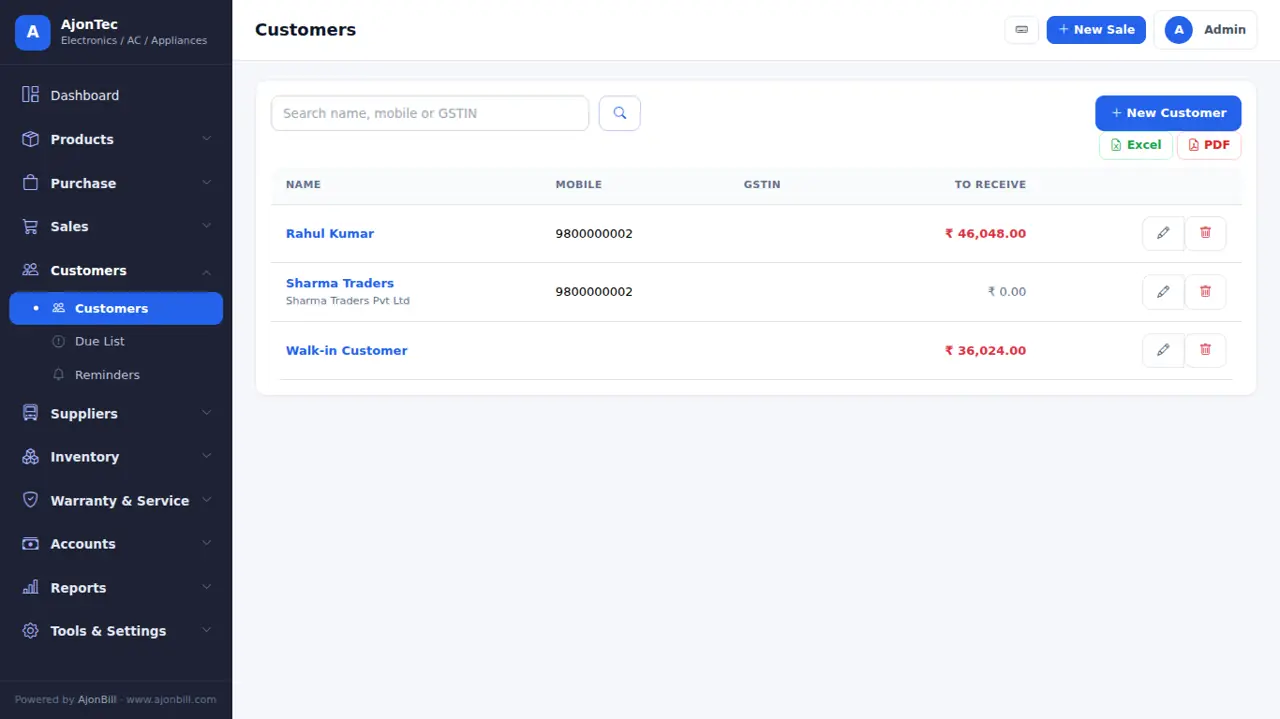
- Customers → All Customers → Add: name, mobile, GSTIN, state, address, opening balance and credit limit.
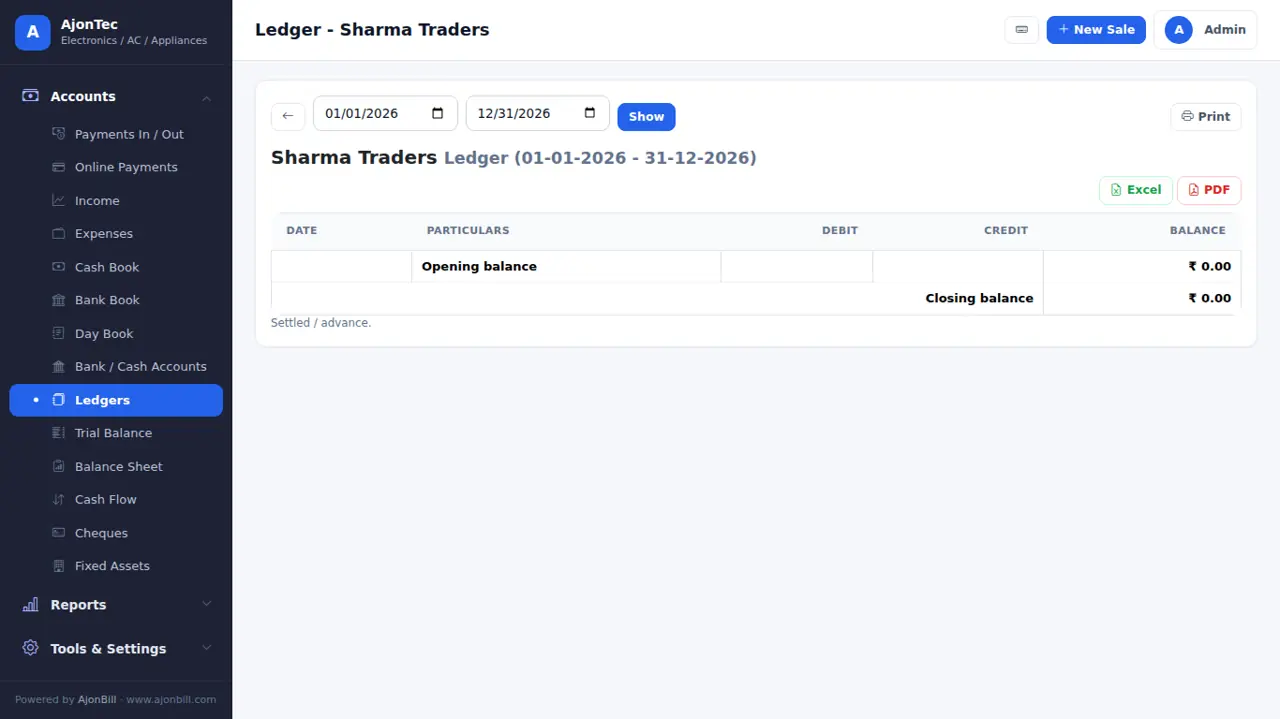
- Click a name for its ledger: every bill, return and payment with the running balance.
13. Payments, dues & reminders
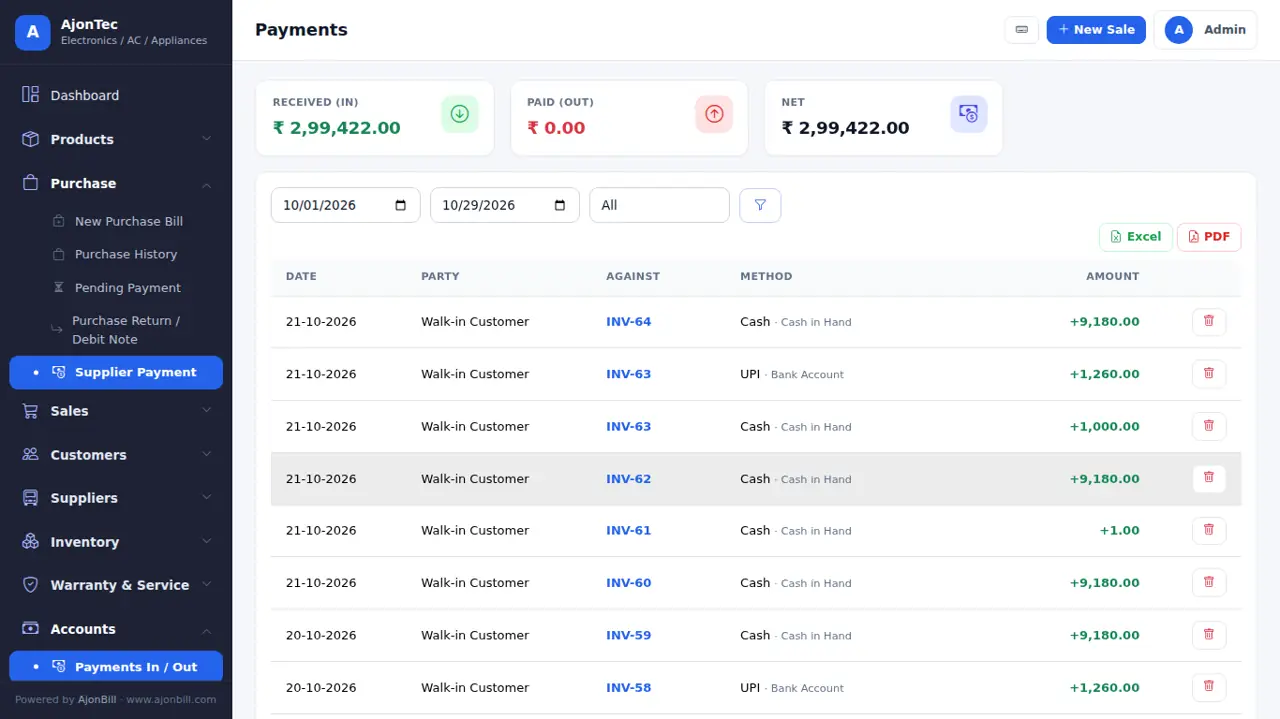
- Accounts → Payments: receive money against bills or on account (advance / old dues).
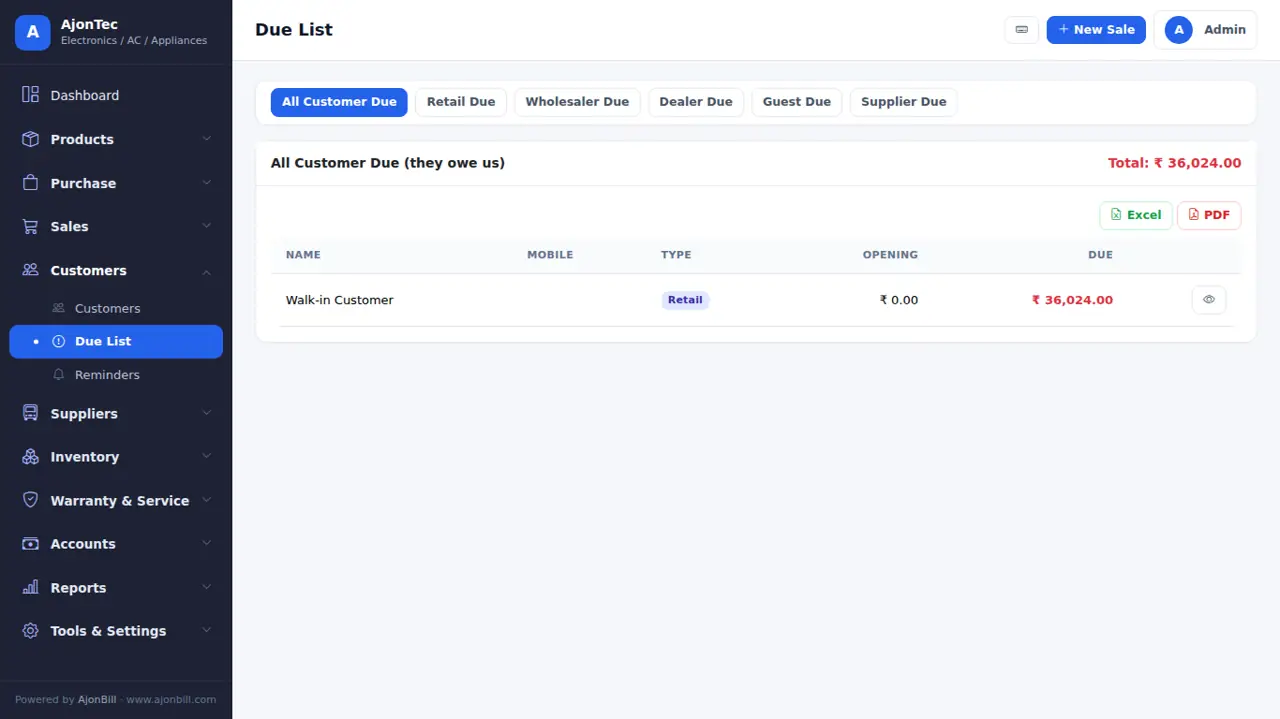
- Due list: who owes you and whom you owe - exactly the ledger balance. Send reminders (SMS / WhatsApp add-on).
14. Expenses & accounts
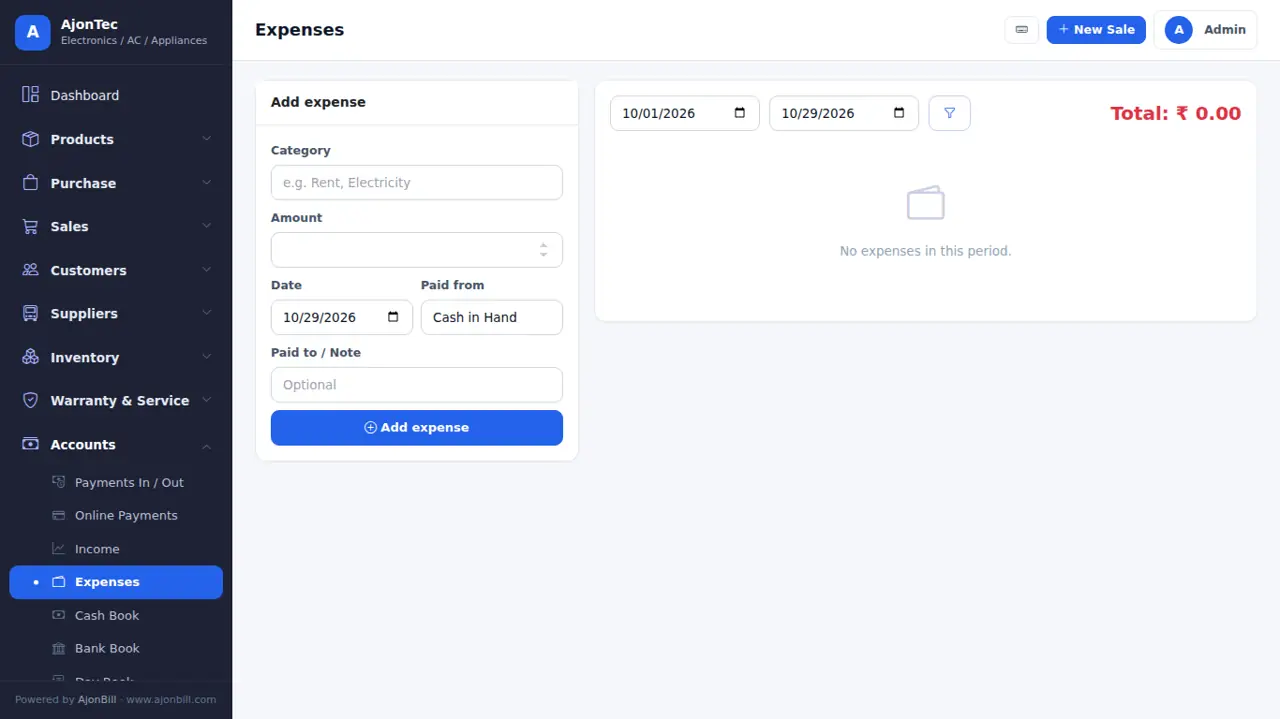
- Expenses: rent, salary, electricity... by category, paid from cash or bank.
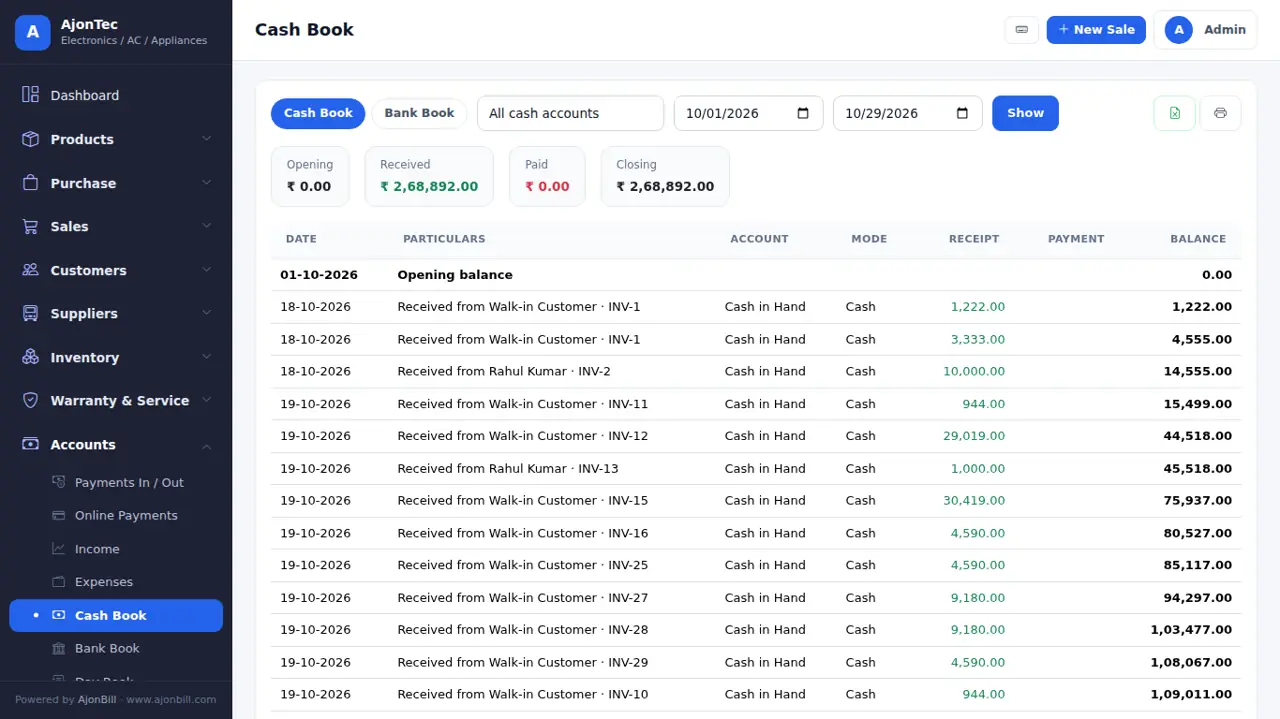
- Cash / Bank book, Day book, cheques, fixed assets, trial balance, P&L and balance sheet.
15. Reports & GST returns
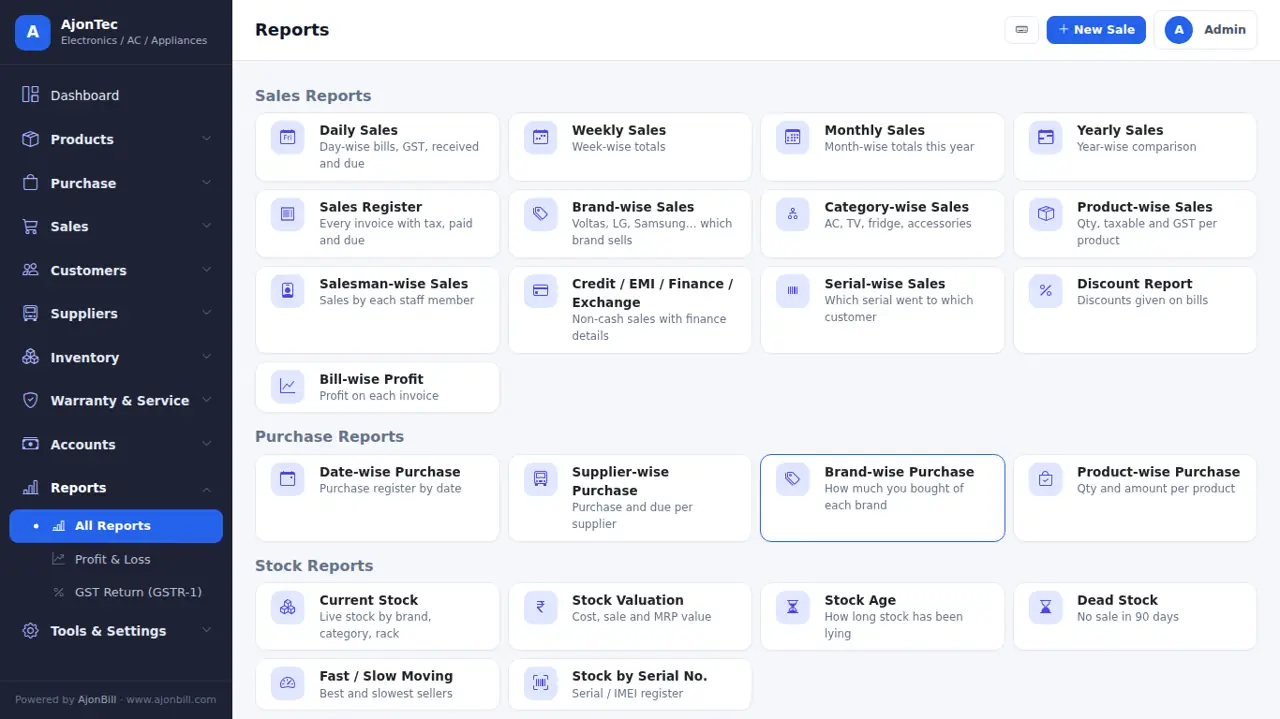
- Reports: sales, purchase, item-wise, party-wise, profit, stock, expiry, day book and more (40+), each with date filter, Excel and PDF.
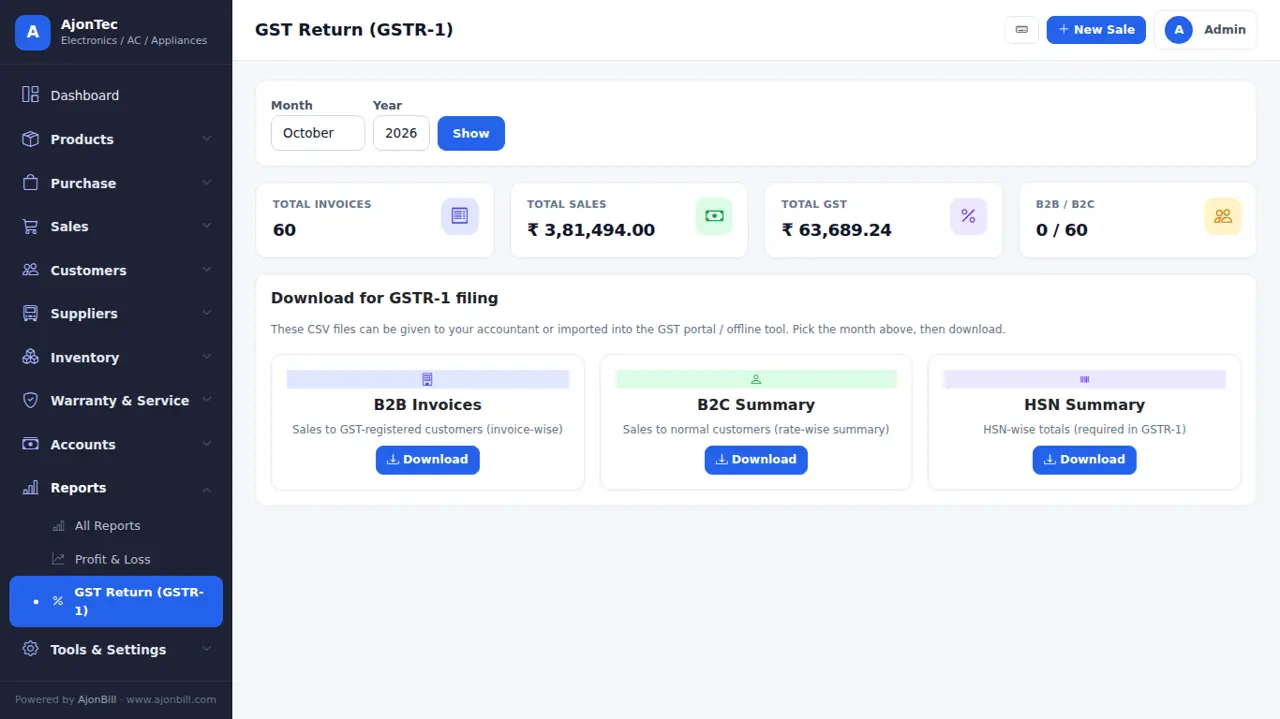
- GST Return: GSTR-1 (B2B, B2C, HSN) and GSTR-3B figures for the month - download JSON / Excel for your CA or the GST portal.
16. Invoice designer
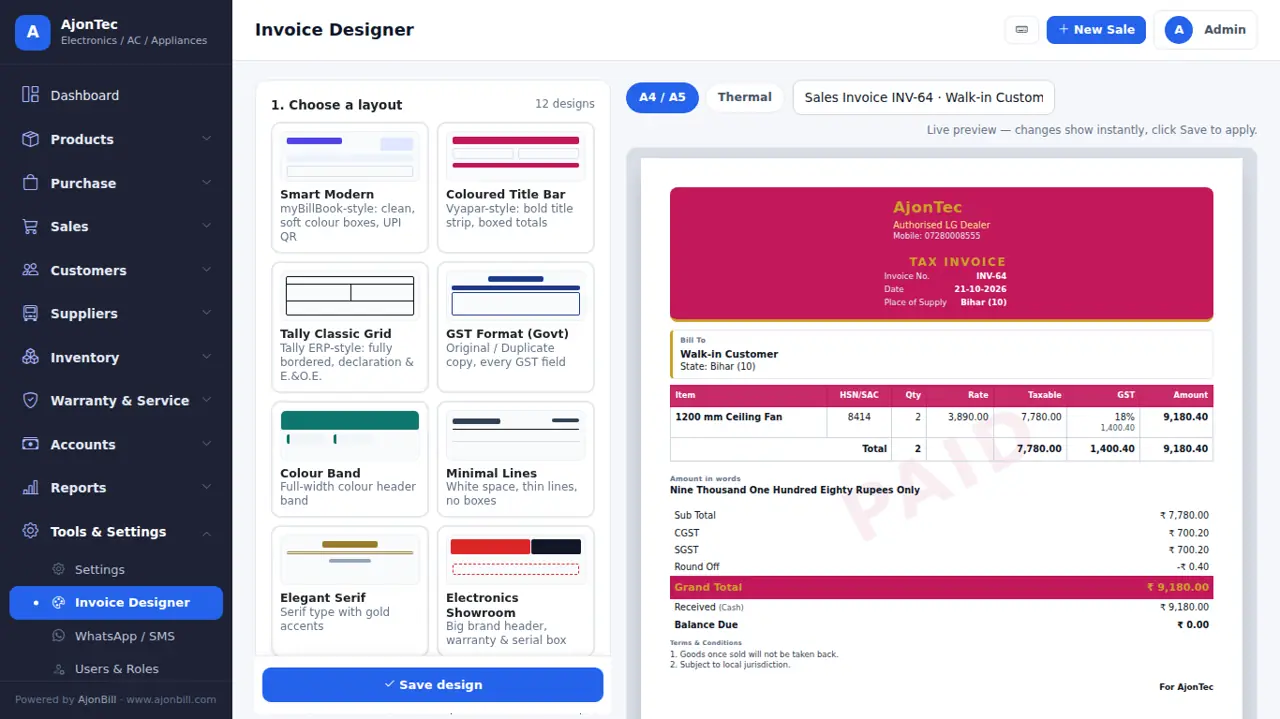
- Tools & Settings → Invoice Designer.
- Choose one of 12 layouts, colour, font, paper (A4 / A5 / thermal), copies and watermark.
- Switch fields on / off (logo, HSN, discount column, bank, UPI QR, signature...) - empty columns disappear by themselves. The live preview shows a sample bill even before your first sale.
- Save design.
17. Settings
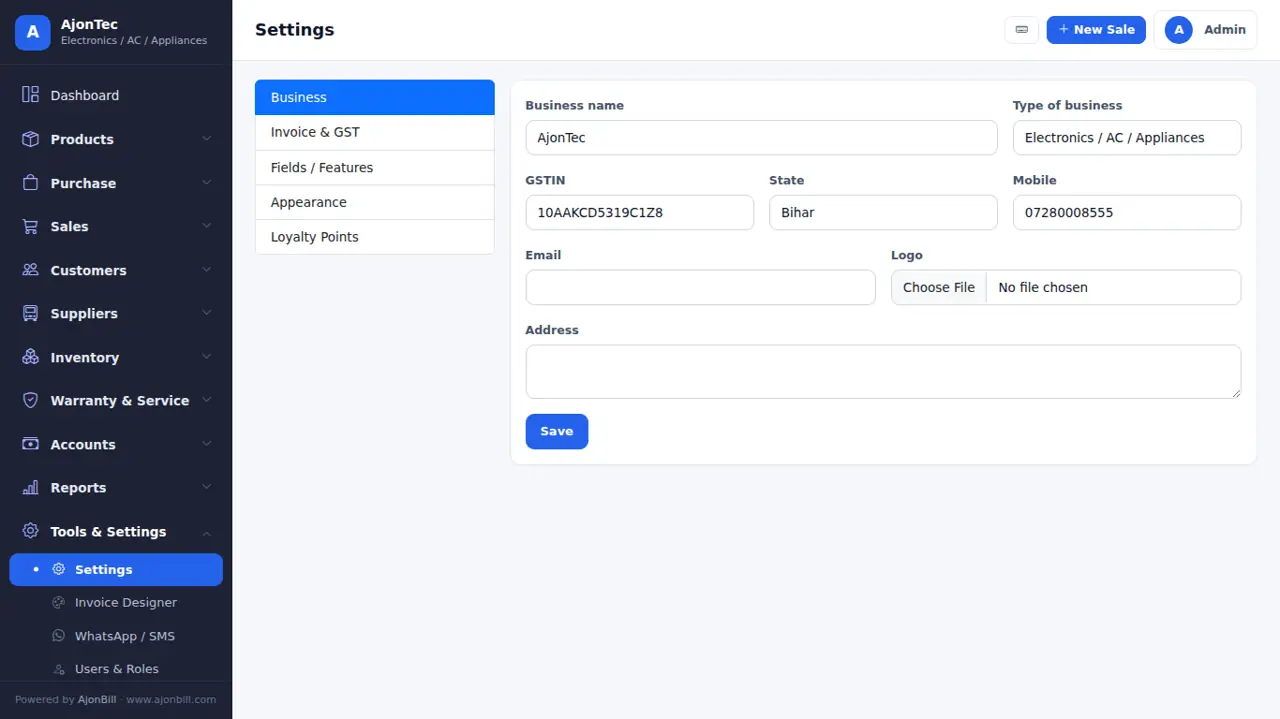
- Business name, address, GSTIN, logo, bank and UPI details, bill numbers (prefix and next number), terms, features for your business, negative stock, round-off and language.
18. Users & roles
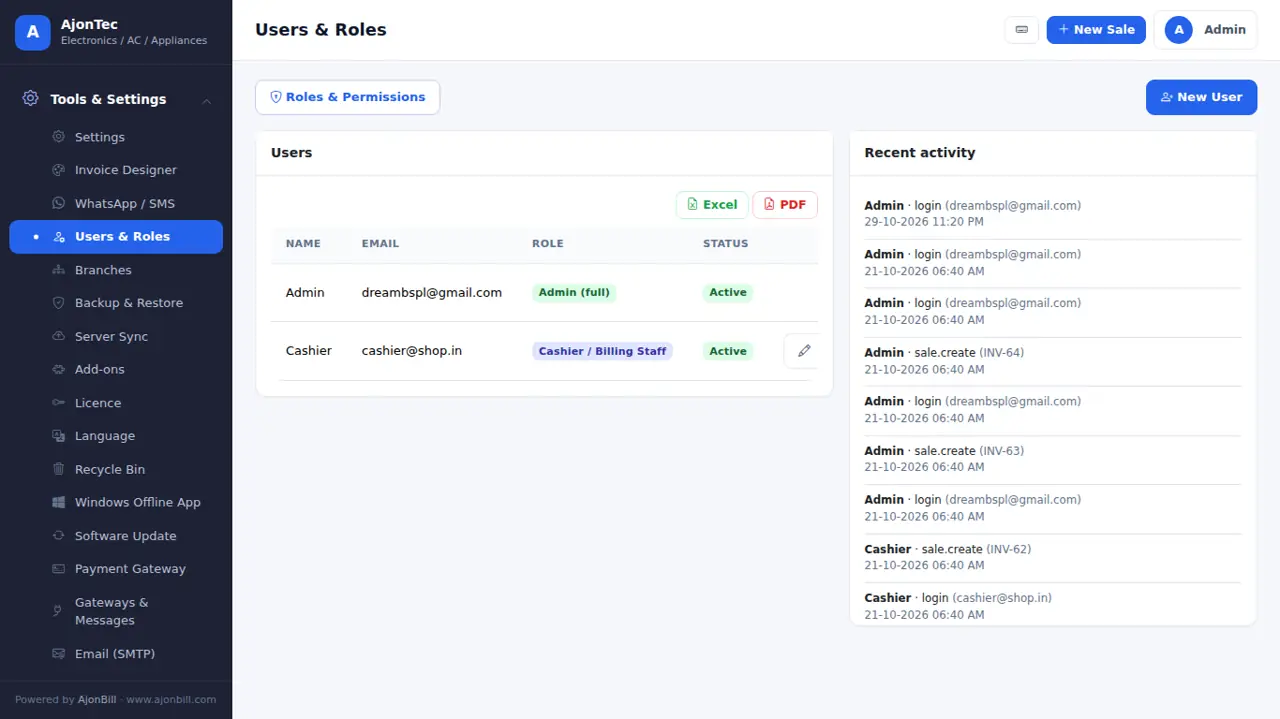
- Tools & Settings → Users & Roles → Add user with email, password and role.
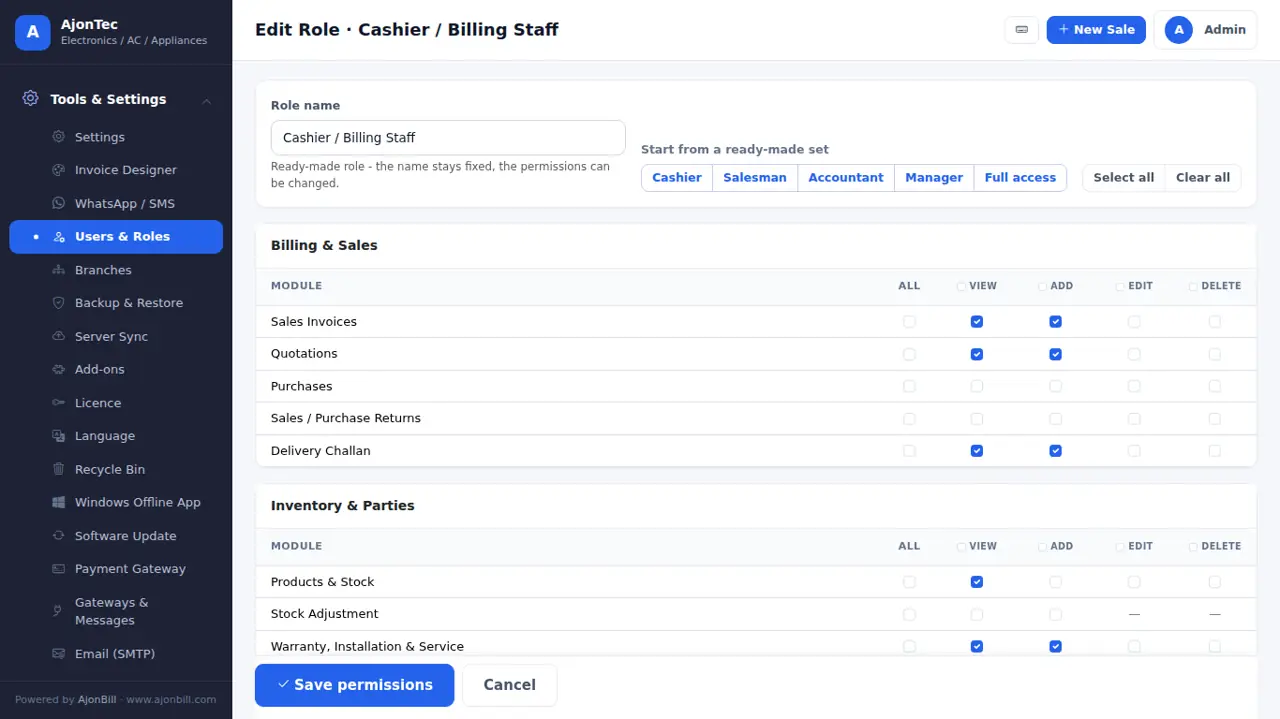
- Open a role: start from Cashier, Salesman, Accountant or Manager, then tick View / Add / Edit / Delete per module.
- Billing controls: change item rate, give discount, see purchase price & profit.
19. Backup, restore & fresh start
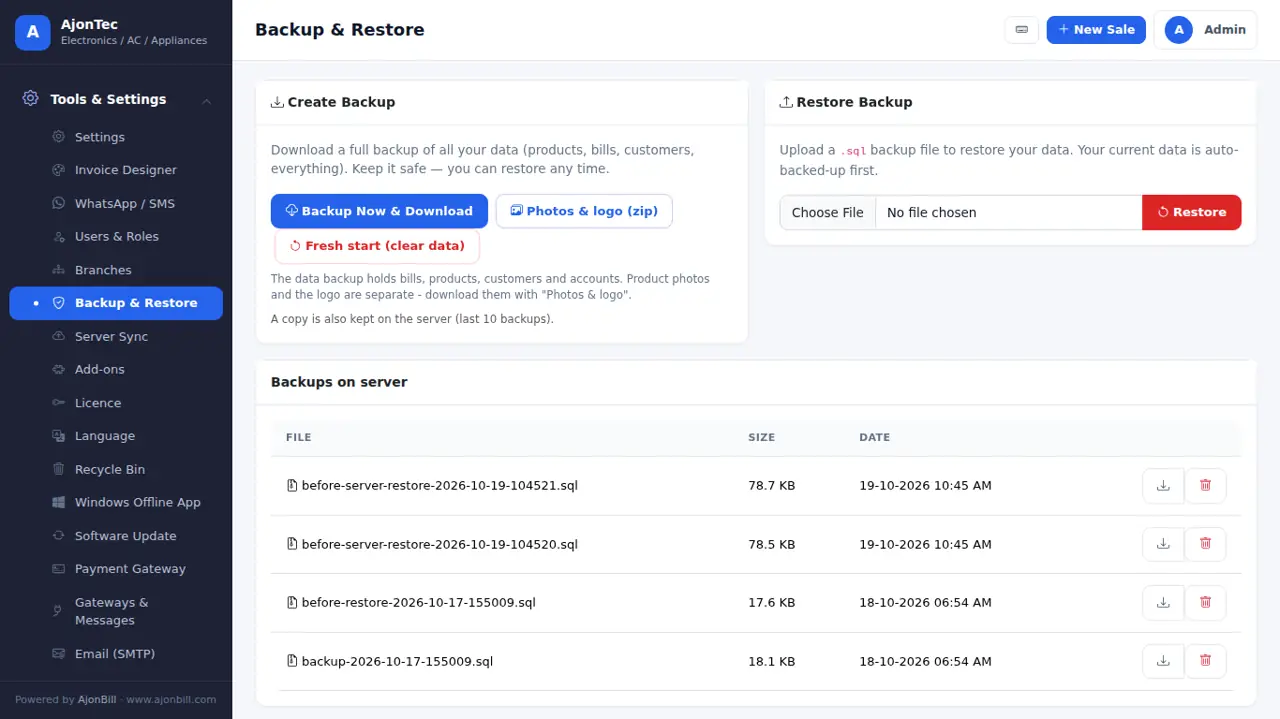
- Backup Now & Download (all data) and Photos & logo (zip) - keep both every week. Restore from a backup file.
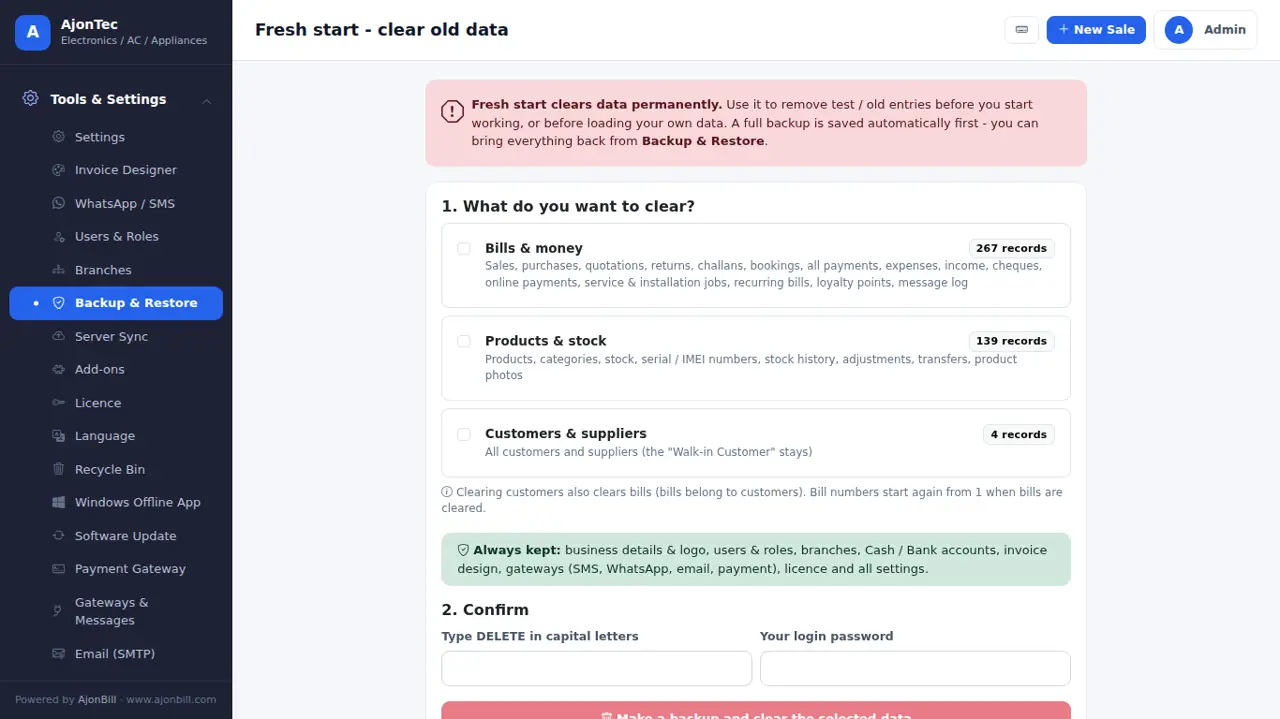
- Fresh start (admin): clear old bills, products or customers before you begin. Business details, users and settings stay; a full backup is made first.
20. Server sync
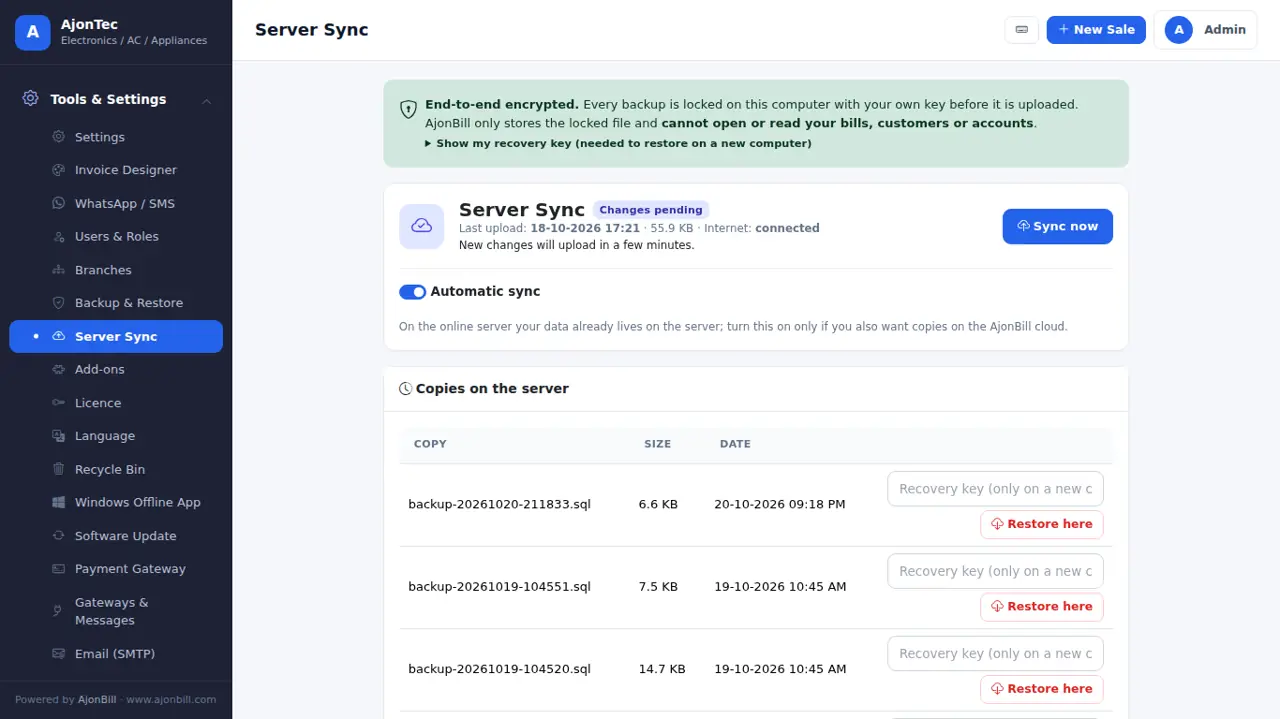
Tools & Settings → Server Sync: your data is encrypted on your computer and uploaded to the AjonBill server automatically. Keep the Recovery Key safe - only you can open the backup.
21. Software update
- When a new version is out you see a note and get an email.
- Tools & Settings → Software Update → Check → Install update now. A backup is made first; your data, settings and design stay.
- Press Ctrl+F5 after the update. See What's new.
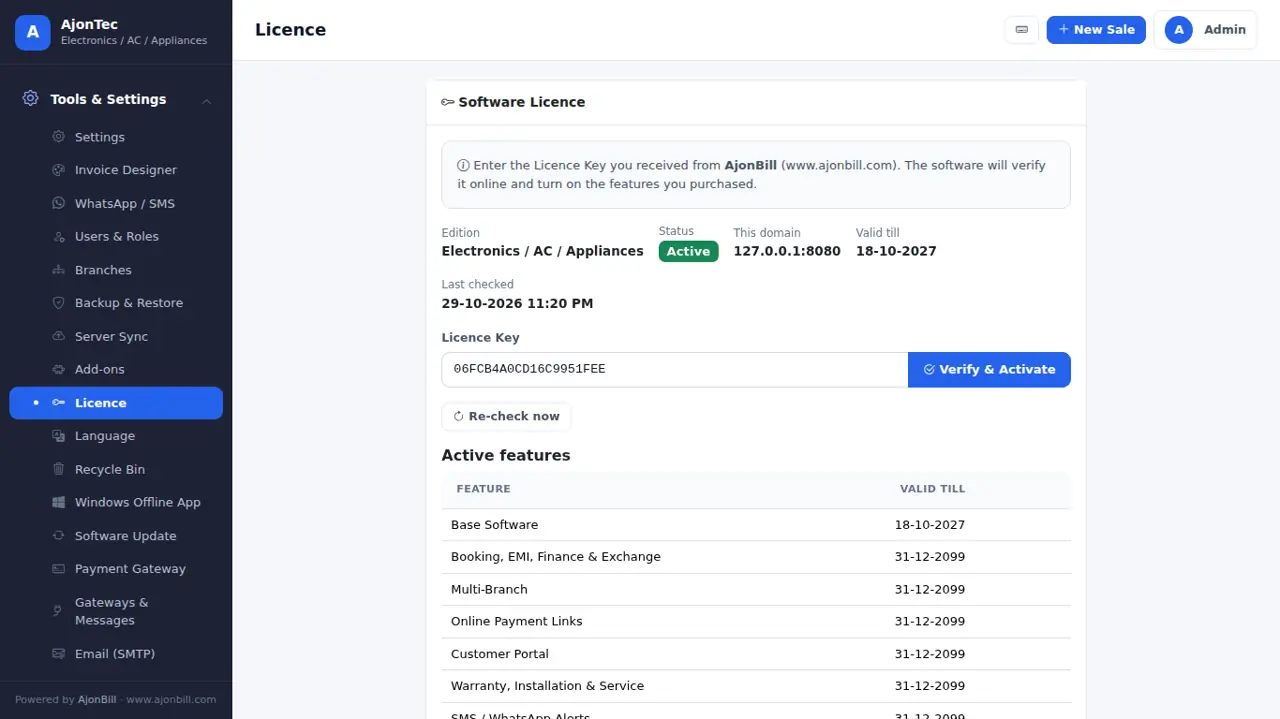
22. Licence
Tools & Settings → Licence: plan, validity, add-ons and Re-check licence. Renew before the end date from here or from your account - it switches on at once.
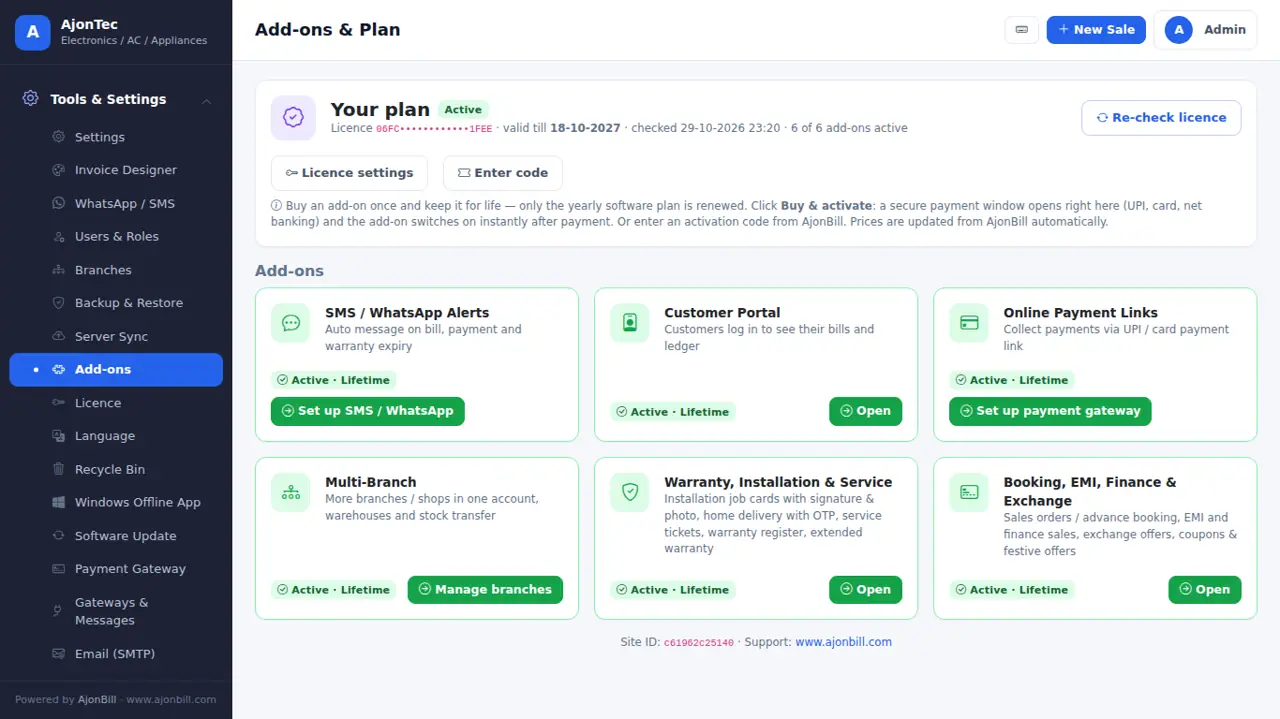
23. Add-ons
Tools & Settings → Add-ons → Buy & activate: a secure payment window opens; the add-on switches on right after payment. One-time payment, yours for life. Options of add-ons you have not bought stay hidden.
- SMS / WhatsApp Alerts - bill, payment, due and warranty messages.
- Customer Portal - customers see their bills and ledger.
- Online Payment Links - customers pay by UPI / card on your own gateway.
- Multi-Branch - more shops, warehouses, stock transfer.
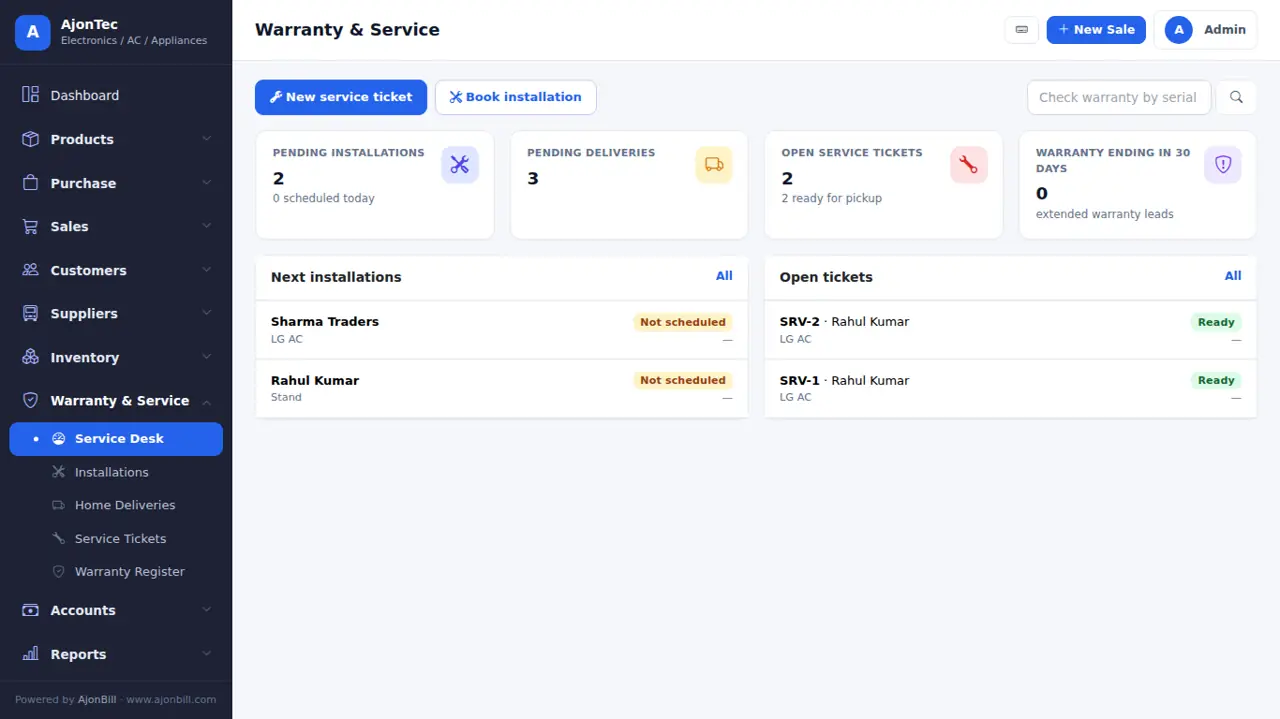
- Warranty, Installation & Service - job cards with signature and photo, delivery OTP, service tickets, extended warranty.
- Booking, EMI, Finance & Exchange - advance booking, EMI / finance sales, exchange, coupons & offers.
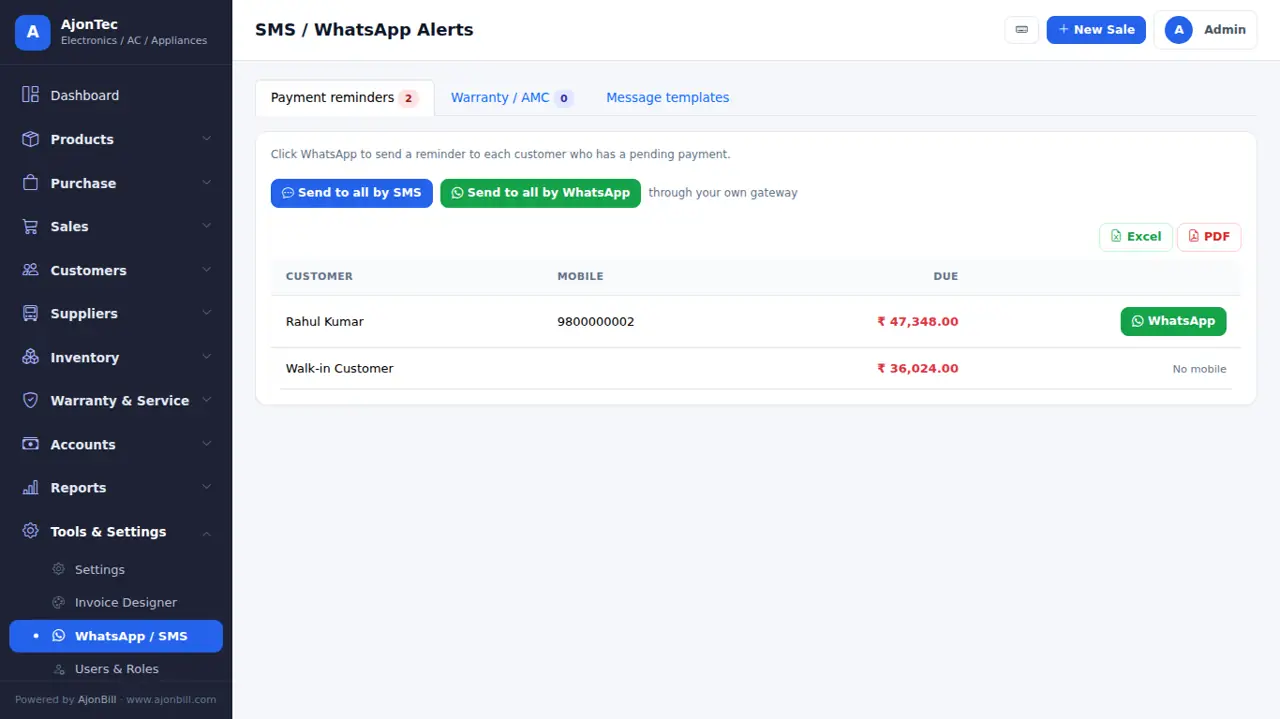
24. SMS, WhatsApp, email & payment gateways (your own accounts)
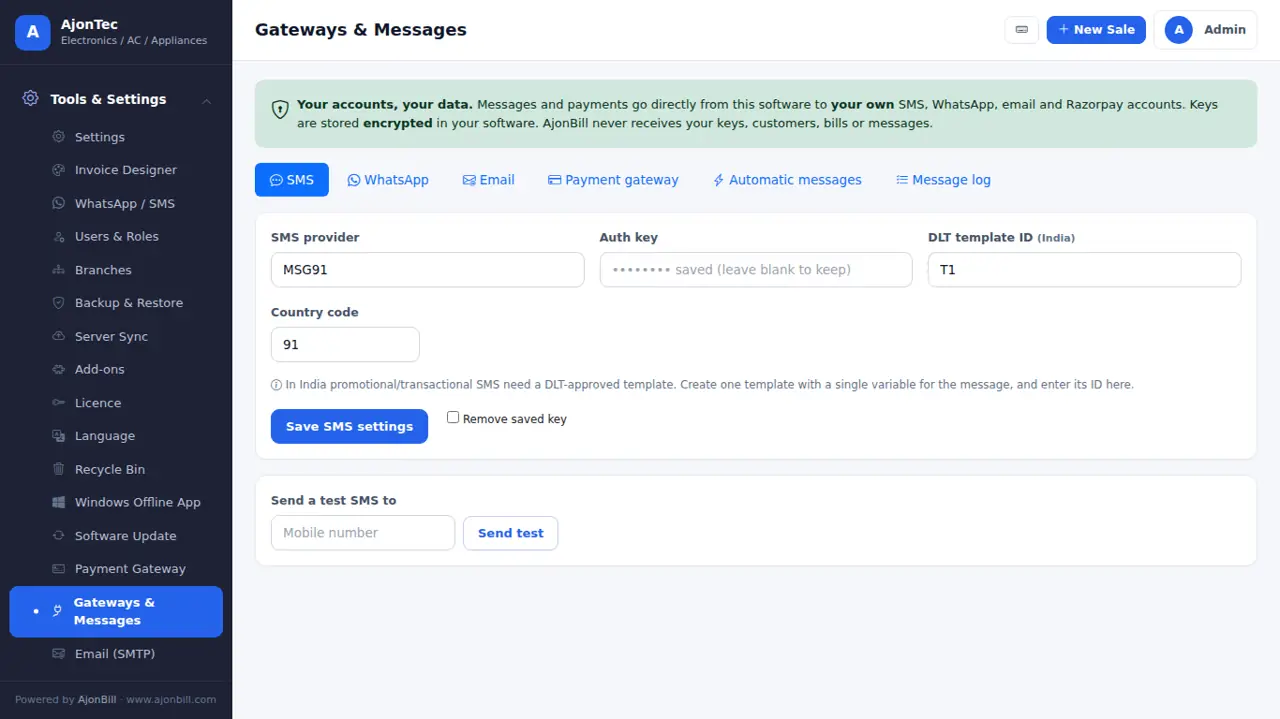
Tools & Settings → Gateways & Messages. Every message and payment uses your own provider account; your keys are stored encrypted. Tabs appear for the add-ons you have.
Email (SMTP) - free
- Gmail: Google Account → Security → 2-Step Verification on → App passwords → create one for "Mail".
- Fill host
smtp.gmail.com, port587, TLS, your Gmail and the 16-letter app password → Send test. - Hostinger mail: host
smtp.hostinger.com, port465, SSL, your mailbox and its password.
SMS (MSG91 / Fast2SMS / Twilio / Textlocal)
- Create an account with the provider and finish DLT registration (required in India) - register your sender ID and templates.
- Copy the API key / auth key, sender ID and template IDs from the provider dashboard.
- Paste them in the SMS tab → Send test.
WhatsApp (Cloud API)
- Meta Business Suite → WhatsApp Manager → add your number → create message templates and wait for approval.
- Meta for Developers → your app → WhatsApp → copy the Phone number ID and a permanent access token.
- Paste them in the WhatsApp tab with the template names → Send test.
Payment gateway (Razorpay, PayU, CCAvenue, Paytm, PhonePe, PayPal)
- Open a merchant account and finish KYC. Add your website domain in the gateway dashboard (Razorpay / CCAvenue need it).
- Razorpay: Dashboard → Account & Settings → API Keys → generate → copy Key ID and Key Secret. PayU: Dashboard → Developer → Key & Salt. Paytm: Developer Settings → API Keys (website
DEFAULTfor live,WEBSTAGINGfor test). PhonePe: Standard Checkout (PG) keys. PayPal: set the currency and rate. - Paste them in the Payment gateway tab, keep Test mode on, make a ₹1 test, then switch to Live.
25. For your business: Electronics / AC / Appliances
Ready for you: Serial / IMEI, AC indoor-outdoor pairs, brand & model, warranty months.
Turn features on or off any time in Settings → Features (brand & model, serial / IMEI, warranty, batch & expiry, size & colour, MRP, barcode).
26. Problems & solutions
- "Licence not active" - Tools & Settings → Licence → Re-check. Check the computer date & time and the internet.
- Windows: "Could not reach www.ajonbill.com" - check the internet and the computer date & time; the message shows a code for support.
- Windows: "Password is wrong" - use the ajonbill.com account password, or click Email me a code.
- Item not added: "Not enough stock" - add stock through a Purchase or turn on Allow negative stock.
- Logo / photos missing after moving - restore the Photos & logo (zip) into
storage/uploads. - Need help? My Account → Support tickets, or WhatsApp / email on ajonbill.com/contact.
27. What's new (version history)
v3.7.2 · 30 Oct 2026 - Windows app brings your website data; role controls for rate, discount and cost
- New: Windows app brings every bill, customer, product and payment from your website copy - bill numbers continue (also Backup > Bring my data from website)
- New: roles - control who can change rates, give discount and see purchase price / profit; ready-made Cashier, Salesman, Accountant, Manager sets
- New: AjonBill can turn the Windows app off for a licence
- New: Windows setup works for accounts without a password (or a forgotten one) - a 6-digit code is emailed and the typed password becomes the ajonbill.com password
- Fixed: Windows app now connects in 3 ways (curl, PHP, Windows PowerShell) for setup, licence and server upload
- Fixed: Windows server sync thought it was always offline - data now uploads automatically
- Fixed: Windows app could not reach www.ajonbill.com (secure connection) - the app now carries its own trusted certificate list; clear messages for no internet / wrong date & time
- New: Windows app first start asks only for email, licence code and password of the ajonbill.com account - business details, admin login and licence are set up by themselves
- New: remove an old Windows computer from your ajonbill.com account
- Fixed: SMS / WhatsApp and payment gateway settings, installation, free gift and service options were visible without their add-on - now shown only after buying
- New: Backup -> Fresh start - clear old bills, products or customers (admin only, password + automatic backup first); business details, users, design and settings stay
- New: an out-of-stock item shows a warning and is not added to the bill (sale, challan, POS); quantity cannot go above stock (unless Allow negative stock is on)
- Improved: Balance due shown right under the Total - it updates as payment is entered
- Improved: no More button - MRP shown in the item; right panel is compact and the Save / Print / Cancel buttons always stay on screen
- Improved: each bill item in 3 clear lines - name & amount / qty, unit, rate, discount, GST, warranty / description & serial - every value fully visible
- Fixed: customer / supplier dues now match the ledger - payments of old dues, advances and returns are counted
- Improved: compact sale & purchase screen - less scrolling
- Improved: options of add-ons you have not bought are hidden (they appear after buying)
- Fixed: up/down arrows in number boxes change by 1 (not by paise); mouse wheel no longer changes numbers
- New: customer dropdown on sale / purchase
- Fixed: GST Format invoice - every show/hide option works, empty rows and columns disappear and the rest fills the page
- Fixed: bill discount - Rs 100 off now takes exactly Rs 100 off the total (or use %)
- Fixed: split payments - Cash + UPI + Card stay separate
- Improved: wider payment panel, chosen items right under the search box, quick qty - / + buttons
- Improved: a saved bill opens straight in your invoice design
- Fixed: Invoice Designer shows a live preview even before the first bill (sample bill, nothing is saved)
- Fixed: stock adjust button opens again and returns to the same page
- Fixed: products, customers and live stock now show every item with page numbers (was limited to 500 / 1000)
- Fixed: product count and low-stock count are exact
- New: product photos - shown in product list, sale/purchase product panel and Quick Billing (POS)
- New: Backup -> Photos & logo (zip)
- Fixed: every paid add-on is now checked on the server for every page (Multi-Branch, Warranty & Service, Booking/EMI, Alerts, Payment Links, Portal)
- Changed: one shop included; more branches, warehouses and stock transfer with Multi-Branch
- New: Payment Gateway and Online Payments in the menu; Set up buttons on every active add-on
- New: customers pay bills online through YOUR gateway - Razorpay, PayU, CCAvenue, Paytm, PhonePe or PayPal; the bill is marked paid automatically
- New: Pay online button on shared bills and payment links by WhatsApp / SMS
- New: Gateways & Messages - connect your own SMS (MSG91, Fast2SMS, Twilio, Textlocal, any API), WhatsApp (Cloud API or any provider), Email and Razorpay
- New: automatic messages - bill, payment, delivery OTP, service ready
- New: send payment and warranty reminders to everyone in one click
- New: Server Sync is end-to-end encrypted with your own recovery key
- Improved: all keys stored encrypted
- Includes: in-software add-on payment, Quick Billing (POS), easier billing screens
v3.7.0 · 29 Oct 2026 - Windows app brings your website data; role controls for rate, discount and cost
- New: Windows app brings every bill, customer, product and payment from your website copy - bill numbers continue (also Backup > Bring my data from website)
- New: roles - control who can change rates, give discount and see purchase price / profit; ready-made Cashier, Salesman, Accountant, Manager sets
- New: AjonBill can turn the Windows app off for a licence
- New: Windows setup works for accounts without a password (or a forgotten one) - a 6-digit code is emailed and the typed password becomes the ajonbill.com password
- Fixed: Windows app now connects in 3 ways (curl, PHP, Windows PowerShell) for setup, licence and server upload
- Fixed: Windows server sync thought it was always offline - data now uploads automatically
- Fixed: Windows app could not reach www.ajonbill.com (secure connection) - the app now carries its own trusted certificate list; clear messages for no internet / wrong date & time
- New: Windows app first start asks only for email, licence code and password of the ajonbill.com account - business details, admin login and licence are set up by themselves
- New: remove an old Windows computer from your ajonbill.com account
- Fixed: SMS / WhatsApp and payment gateway settings, installation, free gift and service options were visible without their add-on - now shown only after buying
- New: Backup -> Fresh start - clear old bills, products or customers (admin only, password + automatic backup first); business details, users, design and settings stay
- New: an out-of-stock item shows a warning and is not added to the bill (sale, challan, POS); quantity cannot go above stock (unless Allow negative stock is on)
- Improved: Balance due shown right under the Total - it updates as payment is entered
- Improved: no More button - MRP shown in the item; right panel is compact and the Save / Print / Cancel buttons always stay on screen
- Improved: each bill item in 3 clear lines - name & amount / qty, unit, rate, discount, GST, warranty / description & serial - every value fully visible
- Fixed: customer / supplier dues now match the ledger - payments of old dues, advances and returns are counted
- Improved: compact sale & purchase screen - less scrolling
- Improved: options of add-ons you have not bought are hidden (they appear after buying)
- Fixed: up/down arrows in number boxes change by 1 (not by paise); mouse wheel no longer changes numbers
- New: customer dropdown on sale / purchase
- Fixed: GST Format invoice - every show/hide option works, empty rows and columns disappear and the rest fills the page
- Fixed: bill discount - Rs 100 off now takes exactly Rs 100 off the total (or use %)
- Fixed: split payments - Cash + UPI + Card stay separate
- Improved: wider payment panel, chosen items right under the search box, quick qty - / + buttons
- Improved: a saved bill opens straight in your invoice design
- Fixed: Invoice Designer shows a live preview even before the first bill (sample bill, nothing is saved)
- Fixed: stock adjust button opens again and returns to the same page
- Fixed: products, customers and live stock now show every item with page numbers (was limited to 500 / 1000)
- Fixed: product count and low-stock count are exact
- New: product photos - shown in product list, sale/purchase product panel and Quick Billing (POS)
- New: Backup -> Photos & logo (zip)
- Fixed: every paid add-on is now checked on the server for every page (Multi-Branch, Warranty & Service, Booking/EMI, Alerts, Payment Links, Portal)
- Changed: one shop included; more branches, warehouses and stock transfer with Multi-Branch
- New: Payment Gateway and Online Payments in the menu; Set up buttons on every active add-on
- New: customers pay bills online through YOUR gateway - Razorpay, PayU, CCAvenue, Paytm, PhonePe or PayPal; the bill is marked paid automatically
- New: Pay online button on shared bills and payment links by WhatsApp / SMS
- New: Gateways & Messages - connect your own SMS (MSG91, Fast2SMS, Twilio, Textlocal, any API), WhatsApp (Cloud API or any provider), Email and Razorpay
- New: automatic messages - bill, payment, delivery OTP, service ready
- New: send payment and warranty reminders to everyone in one click
- New: Server Sync is end-to-end encrypted with your own recovery key
- Improved: all keys stored encrypted
- Includes: in-software add-on payment, Quick Billing (POS), easier billing screens
v3.6.20 · 21 Oct 2026 - Windows app brings your website data; role controls for rate, discount and cost
- New: Windows app brings every bill, customer, product and payment from your website copy - bill numbers continue (also Backup > Bring my data from website)
- New: roles - control who can change rates, give discount and see purchase price / profit; ready-made Cashier, Salesman, Accountant, Manager sets
- New: AjonBill can turn the Windows app off for a licence
- New: Windows setup works for accounts without a password (or a forgotten one) - a 6-digit code is emailed and the typed password becomes the ajonbill.com password
- Fixed: Windows app now connects in 3 ways (curl, PHP, Windows PowerShell) for setup, licence and server upload
- Fixed: Windows server sync thought it was always offline - data now uploads automatically
- Fixed: Windows app could not reach www.ajonbill.com (secure connection) - the app now carries its own trusted certificate list; clear messages for no internet / wrong date & time
- New: Windows app first start asks only for email, licence code and password of the ajonbill.com account - business details, admin login and licence are set up by themselves
- New: remove an old Windows computer from your ajonbill.com account
- Fixed: SMS / WhatsApp and payment gateway settings, installation, free gift and service options were visible without their add-on - now shown only after buying
- New: Backup -> Fresh start - clear old bills, products or customers (admin only, password + automatic backup first); business details, users, design and settings stay
- New: an out-of-stock item shows a warning and is not added to the bill (sale, challan, POS); quantity cannot go above stock (unless Allow negative stock is on)
- Improved: Balance due shown right under the Total - it updates as payment is entered
- Improved: no More button - MRP shown in the item; right panel is compact and the Save / Print / Cancel buttons always stay on screen
- Improved: each bill item in 3 clear lines - name & amount / qty, unit, rate, discount, GST, warranty / description & serial - every value fully visible
- Fixed: customer / supplier dues now match the ledger - payments of old dues, advances and returns are counted
- Improved: compact sale & purchase screen - less scrolling
- Improved: options of add-ons you have not bought are hidden (they appear after buying)
- Fixed: up/down arrows in number boxes change by 1 (not by paise); mouse wheel no longer changes numbers
- New: customer dropdown on sale / purchase
- Fixed: GST Format invoice - every show/hide option works, empty rows and columns disappear and the rest fills the page
- Fixed: bill discount - Rs 100 off now takes exactly Rs 100 off the total (or use %)
- Fixed: split payments - Cash + UPI + Card stay separate
- Improved: wider payment panel, chosen items right under the search box, quick qty - / + buttons
- Improved: a saved bill opens straight in your invoice design
- Fixed: Invoice Designer shows a live preview even before the first bill (sample bill, nothing is saved)
- Fixed: stock adjust button opens again and returns to the same page
- Fixed: products, customers and live stock now show every item with page numbers (was limited to 500 / 1000)
- Fixed: product count and low-stock count are exact
- New: product photos - shown in product list, sale/purchase product panel and Quick Billing (POS)
- New: Backup -> Photos & logo (zip)
- Fixed: every paid add-on is now checked on the server for every page (Multi-Branch, Warranty & Service, Booking/EMI, Alerts, Payment Links, Portal)
- Changed: one shop included; more branches, warehouses and stock transfer with Multi-Branch
- New: Payment Gateway and Online Payments in the menu; Set up buttons on every active add-on
- New: customers pay bills online through YOUR gateway - Razorpay, PayU, CCAvenue, Paytm, PhonePe or PayPal; the bill is marked paid automatically
- New: Pay online button on shared bills and payment links by WhatsApp / SMS
- New: Gateways & Messages - connect your own SMS (MSG91, Fast2SMS, Twilio, Textlocal, any API), WhatsApp (Cloud API or any provider), Email and Razorpay
- New: automatic messages - bill, payment, delivery OTP, service ready
- New: send payment and warranty reminders to everyone in one click
- New: Server Sync is end-to-end encrypted with your own recovery key
- Improved: all keys stored encrypted
- Includes: in-software add-on payment, Quick Billing (POS), easier billing screens
v3.6.18 · 21 Oct 2026 - Windows app: set up with an email code when there is no password
- New: Windows setup works for accounts without a password (or a forgotten one) - a 6-digit code is emailed and the typed password becomes the ajonbill.com password
- Fixed: Windows app now connects in 3 ways (curl, PHP, Windows PowerShell) for setup, licence and server upload
- Fixed: Windows server sync thought it was always offline - data now uploads automatically
- Fixed: Windows app could not reach www.ajonbill.com (secure connection) - the app now carries its own trusted certificate list; clear messages for no internet / wrong date & time
- New: Windows app first start asks only for email, licence code and password of the ajonbill.com account - business details, admin login and licence are set up by themselves
- New: remove an old Windows computer from your ajonbill.com account
- Fixed: SMS / WhatsApp and payment gateway settings, installation, free gift and service options were visible without their add-on - now shown only after buying
- New: Backup -> Fresh start - clear old bills, products or customers (admin only, password + automatic backup first); business details, users, design and settings stay
- New: an out-of-stock item shows a warning and is not added to the bill (sale, challan, POS); quantity cannot go above stock (unless Allow negative stock is on)
- Improved: Balance due shown right under the Total - it updates as payment is entered
- Improved: no More button - MRP shown in the item; right panel is compact and the Save / Print / Cancel buttons always stay on screen
- Improved: each bill item in 3 clear lines - name & amount / qty, unit, rate, discount, GST, warranty / description & serial - every value fully visible
- Fixed: customer / supplier dues now match the ledger - payments of old dues, advances and returns are counted
- Improved: compact sale & purchase screen - less scrolling
- Improved: options of add-ons you have not bought are hidden (they appear after buying)
- Fixed: up/down arrows in number boxes change by 1 (not by paise); mouse wheel no longer changes numbers
- New: customer dropdown on sale / purchase
- Fixed: GST Format invoice - every show/hide option works, empty rows and columns disappear and the rest fills the page
- Fixed: bill discount - Rs 100 off now takes exactly Rs 100 off the total (or use %)
- Fixed: split payments - Cash + UPI + Card stay separate
- Improved: wider payment panel, chosen items right under the search box, quick qty - / + buttons
- Improved: a saved bill opens straight in your invoice design
- Fixed: Invoice Designer shows a live preview even before the first bill (sample bill, nothing is saved)
- Fixed: stock adjust button opens again and returns to the same page
- Fixed: products, customers and live stock now show every item with page numbers (was limited to 500 / 1000)
- Fixed: product count and low-stock count are exact
- New: product photos - shown in product list, sale/purchase product panel and Quick Billing (POS)
- New: Backup -> Photos & logo (zip)
- Fixed: every paid add-on is now checked on the server for every page (Multi-Branch, Warranty & Service, Booking/EMI, Alerts, Payment Links, Portal)
- Changed: one shop included; more branches, warehouses and stock transfer with Multi-Branch
- New: Payment Gateway and Online Payments in the menu; Set up buttons on every active add-on
- New: customers pay bills online through YOUR gateway - Razorpay, PayU, CCAvenue, Paytm, PhonePe or PayPal; the bill is marked paid automatically
- New: Pay online button on shared bills and payment links by WhatsApp / SMS
- New: Gateways & Messages - connect your own SMS (MSG91, Fast2SMS, Twilio, Textlocal, any API), WhatsApp (Cloud API or any provider), Email and Razorpay
- New: automatic messages - bill, payment, delivery OTP, service ready
- New: send payment and warranty reminders to everyone in one click
- New: Server Sync is end-to-end encrypted with your own recovery key
- Improved: all keys stored encrypted
- Includes: in-software add-on payment, Quick Billing (POS), easier billing screens
v3.6.17 · 21 Oct 2026 - Windows app: setup and server upload work on every computer
- Fixed: Windows app now connects in 3 ways (curl, PHP, Windows PowerShell) for setup, licence and server upload
- Fixed: Windows server sync thought it was always offline - data now uploads automatically
- Fixed: Windows app could not reach www.ajonbill.com (secure connection) - the app now carries its own trusted certificate list; clear messages for no internet / wrong date & time
- New: Windows app first start asks only for email, licence code and password of the ajonbill.com account - business details, admin login and licence are set up by themselves
- New: remove an old Windows computer from your ajonbill.com account
- Fixed: SMS / WhatsApp and payment gateway settings, installation, free gift and service options were visible without their add-on - now shown only after buying
- New: Backup -> Fresh start - clear old bills, products or customers (admin only, password + automatic backup first); business details, users, design and settings stay
- New: an out-of-stock item shows a warning and is not added to the bill (sale, challan, POS); quantity cannot go above stock (unless Allow negative stock is on)
- Improved: Balance due shown right under the Total - it updates as payment is entered
- Improved: no More button - MRP shown in the item; right panel is compact and the Save / Print / Cancel buttons always stay on screen
- Improved: each bill item in 3 clear lines - name & amount / qty, unit, rate, discount, GST, warranty / description & serial - every value fully visible
- Fixed: customer / supplier dues now match the ledger - payments of old dues, advances and returns are counted
- Improved: compact sale & purchase screen - less scrolling
- Improved: options of add-ons you have not bought are hidden (they appear after buying)
- Fixed: up/down arrows in number boxes change by 1 (not by paise); mouse wheel no longer changes numbers
- New: customer dropdown on sale / purchase
- Fixed: GST Format invoice - every show/hide option works, empty rows and columns disappear and the rest fills the page
- Fixed: bill discount - Rs 100 off now takes exactly Rs 100 off the total (or use %)
- Fixed: split payments - Cash + UPI + Card stay separate
- Improved: wider payment panel, chosen items right under the search box, quick qty - / + buttons
- Improved: a saved bill opens straight in your invoice design
- Fixed: Invoice Designer shows a live preview even before the first bill (sample bill, nothing is saved)
- Fixed: stock adjust button opens again and returns to the same page
- Fixed: products, customers and live stock now show every item with page numbers (was limited to 500 / 1000)
- Fixed: product count and low-stock count are exact
- New: product photos - shown in product list, sale/purchase product panel and Quick Billing (POS)
- New: Backup -> Photos & logo (zip)
- Fixed: every paid add-on is now checked on the server for every page (Multi-Branch, Warranty & Service, Booking/EMI, Alerts, Payment Links, Portal)
- Changed: one shop included; more branches, warehouses and stock transfer with Multi-Branch
- New: Payment Gateway and Online Payments in the menu; Set up buttons on every active add-on
- New: customers pay bills online through YOUR gateway - Razorpay, PayU, CCAvenue, Paytm, PhonePe or PayPal; the bill is marked paid automatically
- New: Pay online button on shared bills and payment links by WhatsApp / SMS
- New: Gateways & Messages - connect your own SMS (MSG91, Fast2SMS, Twilio, Textlocal, any API), WhatsApp (Cloud API or any provider), Email and Razorpay
- New: automatic messages - bill, payment, delivery OTP, service ready
- New: send payment and warranty reminders to everyone in one click
- New: Server Sync is end-to-end encrypted with your own recovery key
- Improved: all keys stored encrypted
- Includes: in-software add-on payment, Quick Billing (POS), easier billing screens
v3.6.16 · 20 Oct 2026 - Windows app connects to ajonbill.com on every computer
- Fixed: Windows app could not reach www.ajonbill.com (secure connection) - the app now carries its own trusted certificate list; clear messages for no internet / wrong date & time
- New: Windows app first start asks only for email, licence code and password of the ajonbill.com account - business details, admin login and licence are set up by themselves
- New: remove an old Windows computer from your ajonbill.com account
- Fixed: SMS / WhatsApp and payment gateway settings, installation, free gift and service options were visible without their add-on - now shown only after buying
- New: Backup -> Fresh start - clear old bills, products or customers (admin only, password + automatic backup first); business details, users, design and settings stay
- New: an out-of-stock item shows a warning and is not added to the bill (sale, challan, POS); quantity cannot go above stock (unless Allow negative stock is on)
- Improved: Balance due shown right under the Total - it updates as payment is entered
- Improved: no More button - MRP shown in the item; right panel is compact and the Save / Print / Cancel buttons always stay on screen
- Improved: each bill item in 3 clear lines - name & amount / qty, unit, rate, discount, GST, warranty / description & serial - every value fully visible
- Fixed: customer / supplier dues now match the ledger - payments of old dues, advances and returns are counted
- Improved: compact sale & purchase screen - less scrolling
- Improved: options of add-ons you have not bought are hidden (they appear after buying)
- Fixed: up/down arrows in number boxes change by 1 (not by paise); mouse wheel no longer changes numbers
- New: customer dropdown on sale / purchase
- Fixed: GST Format invoice - every show/hide option works, empty rows and columns disappear and the rest fills the page
- Fixed: bill discount - Rs 100 off now takes exactly Rs 100 off the total (or use %)
- Fixed: split payments - Cash + UPI + Card stay separate
- Improved: wider payment panel, chosen items right under the search box, quick qty - / + buttons
- Improved: a saved bill opens straight in your invoice design
- Fixed: Invoice Designer shows a live preview even before the first bill (sample bill, nothing is saved)
- Fixed: stock adjust button opens again and returns to the same page
- Fixed: products, customers and live stock now show every item with page numbers (was limited to 500 / 1000)
- Fixed: product count and low-stock count are exact
- New: product photos - shown in product list, sale/purchase product panel and Quick Billing (POS)
- New: Backup -> Photos & logo (zip)
- Fixed: every paid add-on is now checked on the server for every page (Multi-Branch, Warranty & Service, Booking/EMI, Alerts, Payment Links, Portal)
- Changed: one shop included; more branches, warehouses and stock transfer with Multi-Branch
- New: Payment Gateway and Online Payments in the menu; Set up buttons on every active add-on
- New: customers pay bills online through YOUR gateway - Razorpay, PayU, CCAvenue, Paytm, PhonePe or PayPal; the bill is marked paid automatically
- New: Pay online button on shared bills and payment links by WhatsApp / SMS
- New: Gateways & Messages - connect your own SMS (MSG91, Fast2SMS, Twilio, Textlocal, any API), WhatsApp (Cloud API or any provider), Email and Razorpay
- New: automatic messages - bill, payment, delivery OTP, service ready
- New: send payment and warranty reminders to everyone in one click
- New: Server Sync is end-to-end encrypted with your own recovery key
- Improved: all keys stored encrypted
- Includes: in-software add-on payment, Quick Billing (POS), easier billing screens
v3.6.15 · 20 Oct 2026 - Windows app: start with email, licence code and password
- New: Windows app first start asks only for email, licence code and password of the ajonbill.com account - business details, admin login and licence are set up by themselves
- New: remove an old Windows computer from your ajonbill.com account
- Fixed: SMS / WhatsApp and payment gateway settings, installation, free gift and service options were visible without their add-on - now shown only after buying
- New: Backup -> Fresh start - clear old bills, products or customers (admin only, password + automatic backup first); business details, users, design and settings stay
- New: an out-of-stock item shows a warning and is not added to the bill (sale, challan, POS); quantity cannot go above stock (unless Allow negative stock is on)
- Improved: Balance due shown right under the Total - it updates as payment is entered
- Improved: no More button - MRP shown in the item; right panel is compact and the Save / Print / Cancel buttons always stay on screen
- Improved: each bill item in 3 clear lines - name & amount / qty, unit, rate, discount, GST, warranty / description & serial - every value fully visible
- Fixed: customer / supplier dues now match the ledger - payments of old dues, advances and returns are counted
- Improved: compact sale & purchase screen - less scrolling
- Improved: options of add-ons you have not bought are hidden (they appear after buying)
- Fixed: up/down arrows in number boxes change by 1 (not by paise); mouse wheel no longer changes numbers
- New: customer dropdown on sale / purchase
- Fixed: GST Format invoice - every show/hide option works, empty rows and columns disappear and the rest fills the page
- Fixed: bill discount - Rs 100 off now takes exactly Rs 100 off the total (or use %)
- Fixed: split payments - Cash + UPI + Card stay separate
- Improved: wider payment panel, chosen items right under the search box, quick qty - / + buttons
- Improved: a saved bill opens straight in your invoice design
- Fixed: Invoice Designer shows a live preview even before the first bill (sample bill, nothing is saved)
- Fixed: stock adjust button opens again and returns to the same page
- Fixed: products, customers and live stock now show every item with page numbers (was limited to 500 / 1000)
- Fixed: product count and low-stock count are exact
- New: product photos - shown in product list, sale/purchase product panel and Quick Billing (POS)
- New: Backup -> Photos & logo (zip)
- Fixed: every paid add-on is now checked on the server for every page (Multi-Branch, Warranty & Service, Booking/EMI, Alerts, Payment Links, Portal)
- Changed: one shop included; more branches, warehouses and stock transfer with Multi-Branch
- New: Payment Gateway and Online Payments in the menu; Set up buttons on every active add-on
- New: customers pay bills online through YOUR gateway - Razorpay, PayU, CCAvenue, Paytm, PhonePe or PayPal; the bill is marked paid automatically
- New: Pay online button on shared bills and payment links by WhatsApp / SMS
- New: Gateways & Messages - connect your own SMS (MSG91, Fast2SMS, Twilio, Textlocal, any API), WhatsApp (Cloud API or any provider), Email and Razorpay
- New: automatic messages - bill, payment, delivery OTP, service ready
- New: send payment and warranty reminders to everyone in one click
- New: Server Sync is end-to-end encrypted with your own recovery key
- Improved: all keys stored encrypted
- Includes: in-software add-on payment, Quick Billing (POS), easier billing screens
v3.6.14 · 20 Oct 2026 - Add-on settings stay locked until the add-on is bought
- Fixed: SMS / WhatsApp and payment gateway settings, installation, free gift and service options were visible without their add-on - now shown only after buying
- New: Backup -> Fresh start - clear old bills, products or customers (admin only, password + automatic backup first); business details, users, design and settings stay
- New: an out-of-stock item shows a warning and is not added to the bill (sale, challan, POS); quantity cannot go above stock (unless Allow negative stock is on)
- Improved: Balance due shown right under the Total - it updates as payment is entered
- Improved: no More button - MRP shown in the item; right panel is compact and the Save / Print / Cancel buttons always stay on screen
- Improved: each bill item in 3 clear lines - name & amount / qty, unit, rate, discount, GST, warranty / description & serial - every value fully visible
- Fixed: customer / supplier dues now match the ledger - payments of old dues, advances and returns are counted
- Improved: compact sale & purchase screen - less scrolling
- Improved: options of add-ons you have not bought are hidden (they appear after buying)
- Fixed: up/down arrows in number boxes change by 1 (not by paise); mouse wheel no longer changes numbers
- New: customer dropdown on sale / purchase
- Fixed: GST Format invoice - every show/hide option works, empty rows and columns disappear and the rest fills the page
- Fixed: bill discount - Rs 100 off now takes exactly Rs 100 off the total (or use %)
- Fixed: split payments - Cash + UPI + Card stay separate
- Improved: wider payment panel, chosen items right under the search box, quick qty - / + buttons
- Improved: a saved bill opens straight in your invoice design
- Fixed: Invoice Designer shows a live preview even before the first bill (sample bill, nothing is saved)
- Fixed: stock adjust button opens again and returns to the same page
- Fixed: products, customers and live stock now show every item with page numbers (was limited to 500 / 1000)
- Fixed: product count and low-stock count are exact
- New: product photos - shown in product list, sale/purchase product panel and Quick Billing (POS)
- New: Backup -> Photos & logo (zip)
- Fixed: every paid add-on is now checked on the server for every page (Multi-Branch, Warranty & Service, Booking/EMI, Alerts, Payment Links, Portal)
- Changed: one shop included; more branches, warehouses and stock transfer with Multi-Branch
- New: Payment Gateway and Online Payments in the menu; Set up buttons on every active add-on
- New: customers pay bills online through YOUR gateway - Razorpay, PayU, CCAvenue, Paytm, PhonePe or PayPal; the bill is marked paid automatically
- New: Pay online button on shared bills and payment links by WhatsApp / SMS
- New: Gateways & Messages - connect your own SMS (MSG91, Fast2SMS, Twilio, Textlocal, any API), WhatsApp (Cloud API or any provider), Email and Razorpay
- New: automatic messages - bill, payment, delivery OTP, service ready
- New: send payment and warranty reminders to everyone in one click
- New: Server Sync is end-to-end encrypted with your own recovery key
- Improved: all keys stored encrypted
- Includes: in-software add-on payment, Quick Billing (POS), easier billing screens
v3.6.13 · 20 Oct 2026 - Fresh start: clear old data safely
- New: Backup -> Fresh start - clear old bills, products or customers (admin only, password + automatic backup first); business details, users, design and settings stay
- New: an out-of-stock item shows a warning and is not added to the bill (sale, challan, POS); quantity cannot go above stock (unless Allow negative stock is on)
- Improved: Balance due shown right under the Total - it updates as payment is entered
- Improved: no More button - MRP shown in the item; right panel is compact and the Save / Print / Cancel buttons always stay on screen
- Improved: each bill item in 3 clear lines - name & amount / qty, unit, rate, discount, GST, warranty / description & serial - every value fully visible
- Fixed: customer / supplier dues now match the ledger - payments of old dues, advances and returns are counted
- Improved: compact sale & purchase screen - less scrolling
- Improved: options of add-ons you have not bought are hidden (they appear after buying)
- Fixed: up/down arrows in number boxes change by 1 (not by paise); mouse wheel no longer changes numbers
- New: customer dropdown on sale / purchase
- Fixed: GST Format invoice - every show/hide option works, empty rows and columns disappear and the rest fills the page
- Fixed: bill discount - Rs 100 off now takes exactly Rs 100 off the total (or use %)
- Fixed: split payments - Cash + UPI + Card stay separate
- Improved: wider payment panel, chosen items right under the search box, quick qty - / + buttons
- Improved: a saved bill opens straight in your invoice design
- Fixed: Invoice Designer shows a live preview even before the first bill (sample bill, nothing is saved)
- Fixed: stock adjust button opens again and returns to the same page
- Fixed: products, customers and live stock now show every item with page numbers (was limited to 500 / 1000)
- Fixed: product count and low-stock count are exact
- New: product photos - shown in product list, sale/purchase product panel and Quick Billing (POS)
- New: Backup -> Photos & logo (zip)
- Fixed: every paid add-on is now checked on the server for every page (Multi-Branch, Warranty & Service, Booking/EMI, Alerts, Payment Links, Portal)
- Changed: one shop included; more branches, warehouses and stock transfer with Multi-Branch
- New: Payment Gateway and Online Payments in the menu; Set up buttons on every active add-on
- New: customers pay bills online through YOUR gateway - Razorpay, PayU, CCAvenue, Paytm, PhonePe or PayPal; the bill is marked paid automatically
- New: Pay online button on shared bills and payment links by WhatsApp / SMS
- New: Gateways & Messages - connect your own SMS (MSG91, Fast2SMS, Twilio, Textlocal, any API), WhatsApp (Cloud API or any provider), Email and Razorpay
- New: automatic messages - bill, payment, delivery OTP, service ready
- New: send payment and warranty reminders to everyone in one click
- New: Server Sync is end-to-end encrypted with your own recovery key
- Improved: all keys stored encrypted
- Includes: in-software add-on payment, Quick Billing (POS), easier billing screens
v3.6.12 · 20 Oct 2026 - Out-of-stock items cannot be billed by mistake
- New: an out-of-stock item shows a warning and is not added to the bill (sale, challan, POS); quantity cannot go above stock (unless Allow negative stock is on)
- Improved: Balance due shown right under the Total - it updates as payment is entered
- Improved: no More button - MRP shown in the item; right panel is compact and the Save / Print / Cancel buttons always stay on screen
- Improved: each bill item in 3 clear lines - name & amount / qty, unit, rate, discount, GST, warranty / description & serial - every value fully visible
- Fixed: customer / supplier dues now match the ledger - payments of old dues, advances and returns are counted
- Improved: compact sale & purchase screen - less scrolling
- Improved: options of add-ons you have not bought are hidden (they appear after buying)
- Fixed: up/down arrows in number boxes change by 1 (not by paise); mouse wheel no longer changes numbers
- New: customer dropdown on sale / purchase
- Fixed: GST Format invoice - every show/hide option works, empty rows and columns disappear and the rest fills the page
- Fixed: bill discount - Rs 100 off now takes exactly Rs 100 off the total (or use %)
- Fixed: split payments - Cash + UPI + Card stay separate
- Improved: wider payment panel, chosen items right under the search box, quick qty - / + buttons
- Improved: a saved bill opens straight in your invoice design
- Fixed: Invoice Designer shows a live preview even before the first bill (sample bill, nothing is saved)
- Fixed: stock adjust button opens again and returns to the same page
- Fixed: products, customers and live stock now show every item with page numbers (was limited to 500 / 1000)
- Fixed: product count and low-stock count are exact
- New: product photos - shown in product list, sale/purchase product panel and Quick Billing (POS)
- New: Backup -> Photos & logo (zip)
- Fixed: every paid add-on is now checked on the server for every page (Multi-Branch, Warranty & Service, Booking/EMI, Alerts, Payment Links, Portal)
- Changed: one shop included; more branches, warehouses and stock transfer with Multi-Branch
- New: Payment Gateway and Online Payments in the menu; Set up buttons on every active add-on
- New: customers pay bills online through YOUR gateway - Razorpay, PayU, CCAvenue, Paytm, PhonePe or PayPal; the bill is marked paid automatically
- New: Pay online button on shared bills and payment links by WhatsApp / SMS
- New: Gateways & Messages - connect your own SMS (MSG91, Fast2SMS, Twilio, Textlocal, any API), WhatsApp (Cloud API or any provider), Email and Razorpay
- New: automatic messages - bill, payment, delivery OTP, service ready
- New: send payment and warranty reminders to everyone in one click
- New: Server Sync is end-to-end encrypted with your own recovery key
- Improved: all keys stored encrypted
- Includes: in-software add-on payment, Quick Billing (POS), easier billing screens
v3.6.11 · 20 Oct 2026 - Bill screen: balance due under the total, all fields visible
- Improved: Balance due shown right under the Total - it updates as payment is entered
- Improved: no More button - MRP shown in the item; right panel is compact and the Save / Print / Cancel buttons always stay on screen
- Improved: each bill item in 3 clear lines - name & amount / qty, unit, rate, discount, GST, warranty / description & serial - every value fully visible
- Fixed: customer / supplier dues now match the ledger - payments of old dues, advances and returns are counted
- Improved: compact sale & purchase screen - less scrolling
- Improved: options of add-ons you have not bought are hidden (they appear after buying)
- Fixed: up/down arrows in number boxes change by 1 (not by paise); mouse wheel no longer changes numbers
- New: customer dropdown on sale / purchase
- Fixed: GST Format invoice - every show/hide option works, empty rows and columns disappear and the rest fills the page
- Fixed: bill discount - Rs 100 off now takes exactly Rs 100 off the total (or use %)
- Fixed: split payments - Cash + UPI + Card stay separate
- Improved: wider payment panel, chosen items right under the search box, quick qty - / + buttons
- Improved: a saved bill opens straight in your invoice design
- Fixed: Invoice Designer shows a live preview even before the first bill (sample bill, nothing is saved)
- Fixed: stock adjust button opens again and returns to the same page
- Fixed: products, customers and live stock now show every item with page numbers (was limited to 500 / 1000)
- Fixed: product count and low-stock count are exact
- New: product photos - shown in product list, sale/purchase product panel and Quick Billing (POS)
- New: Backup -> Photos & logo (zip)
- Fixed: every paid add-on is now checked on the server for every page (Multi-Branch, Warranty & Service, Booking/EMI, Alerts, Payment Links, Portal)
- Changed: one shop included; more branches, warehouses and stock transfer with Multi-Branch
- New: Payment Gateway and Online Payments in the menu; Set up buttons on every active add-on
- New: customers pay bills online through YOUR gateway - Razorpay, PayU, CCAvenue, Paytm, PhonePe or PayPal; the bill is marked paid automatically
- New: Pay online button on shared bills and payment links by WhatsApp / SMS
- New: Gateways & Messages - connect your own SMS (MSG91, Fast2SMS, Twilio, Textlocal, any API), WhatsApp (Cloud API or any provider), Email and Razorpay
- New: automatic messages - bill, payment, delivery OTP, service ready
- New: send payment and warranty reminders to everyone in one click
- New: Server Sync is end-to-end encrypted with your own recovery key
- Improved: all keys stored encrypted
- Includes: in-software add-on payment, Quick Billing (POS), easier billing screens
v3.6.10 · 20 Oct 2026 - Bill screen: all item fields visible, Save buttons always on screen
- Improved: no More button - MRP shown in the item; right panel is compact and the Save / Print / Cancel buttons always stay on screen
- Improved: each bill item in 3 clear lines - name & amount / qty, unit, rate, discount, GST, warranty / description & serial - every value fully visible
- Fixed: customer / supplier dues now match the ledger - payments of old dues, advances and returns are counted
- Improved: compact sale & purchase screen - less scrolling
- Improved: options of add-ons you have not bought are hidden (they appear after buying)
- Fixed: up/down arrows in number boxes change by 1 (not by paise); mouse wheel no longer changes numbers
- New: customer dropdown on sale / purchase
- Fixed: GST Format invoice - every show/hide option works, empty rows and columns disappear and the rest fills the page
- Fixed: bill discount - Rs 100 off now takes exactly Rs 100 off the total (or use %)
- Fixed: split payments - Cash + UPI + Card stay separate
- Improved: wider payment panel, chosen items right under the search box, quick qty - / + buttons
- Improved: a saved bill opens straight in your invoice design
- Fixed: Invoice Designer shows a live preview even before the first bill (sample bill, nothing is saved)
- Fixed: stock adjust button opens again and returns to the same page
- Fixed: products, customers and live stock now show every item with page numbers (was limited to 500 / 1000)
- Fixed: product count and low-stock count are exact
- New: product photos - shown in product list, sale/purchase product panel and Quick Billing (POS)
- New: Backup -> Photos & logo (zip)
- Fixed: every paid add-on is now checked on the server for every page (Multi-Branch, Warranty & Service, Booking/EMI, Alerts, Payment Links, Portal)
- Changed: one shop included; more branches, warehouses and stock transfer with Multi-Branch
- New: Payment Gateway and Online Payments in the menu; Set up buttons on every active add-on
- New: customers pay bills online through YOUR gateway - Razorpay, PayU, CCAvenue, Paytm, PhonePe or PayPal; the bill is marked paid automatically
- New: Pay online button on shared bills and payment links by WhatsApp / SMS
- New: Gateways & Messages - connect your own SMS (MSG91, Fast2SMS, Twilio, Textlocal, any API), WhatsApp (Cloud API or any provider), Email and Razorpay
- New: automatic messages - bill, payment, delivery OTP, service ready
- New: send payment and warranty reminders to everyone in one click
- New: Server Sync is end-to-end encrypted with your own recovery key
- Improved: all keys stored encrypted
- Includes: in-software add-on payment, Quick Billing (POS), easier billing screens
v3.6.9 · 20 Oct 2026 - Clear 3-line bill items, exact customer dues, hidden locked options
- Improved: each bill item in 3 clear lines - name & amount / qty, unit, rate, discount, GST, warranty / description & serial - every value fully visible
- Fixed: customer / supplier dues now match the ledger - payments of old dues, advances and returns are counted
- Improved: compact sale & purchase screen - less scrolling
- Improved: options of add-ons you have not bought are hidden (they appear after buying)
- Fixed: up/down arrows in number boxes change by 1 (not by paise); mouse wheel no longer changes numbers
- New: customer dropdown on sale / purchase
- Fixed: GST Format invoice - every show/hide option works, empty rows and columns disappear and the rest fills the page
- Fixed: bill discount - Rs 100 off now takes exactly Rs 100 off the total (or use %)
- Fixed: split payments - Cash + UPI + Card stay separate
- Improved: wider payment panel, chosen items right under the search box, quick qty - / + buttons
- Improved: a saved bill opens straight in your invoice design
- Fixed: Invoice Designer shows a live preview even before the first bill (sample bill, nothing is saved)
- Fixed: stock adjust button opens again and returns to the same page
- Fixed: products, customers and live stock now show every item with page numbers (was limited to 500 / 1000)
- Fixed: product count and low-stock count are exact
- New: product photos - shown in product list, sale/purchase product panel and Quick Billing (POS)
- New: Backup -> Photos & logo (zip)
- Fixed: every paid add-on is now checked on the server for every page (Multi-Branch, Warranty & Service, Booking/EMI, Alerts, Payment Links, Portal)
- Changed: one shop included; more branches, warehouses and stock transfer with Multi-Branch
- New: Payment Gateway and Online Payments in the menu; Set up buttons on every active add-on
- New: customers pay bills online through YOUR gateway - Razorpay, PayU, CCAvenue, Paytm, PhonePe or PayPal; the bill is marked paid automatically
- New: Pay online button on shared bills and payment links by WhatsApp / SMS
- New: Gateways & Messages - connect your own SMS (MSG91, Fast2SMS, Twilio, Textlocal, any API), WhatsApp (Cloud API or any provider), Email and Razorpay
- New: automatic messages - bill, payment, delivery OTP, service ready
- New: send payment and warranty reminders to everyone in one click
- New: Server Sync is end-to-end encrypted with your own recovery key
- Improved: all keys stored encrypted
- Includes: in-software add-on payment, Quick Billing (POS), easier billing screens
v3.6.8 · 20 Oct 2026 - Compact bill screen, hidden locked options, exact customer dues
- Fixed: customer / supplier dues now match the ledger - payments of old dues, advances and returns are counted
- Improved: compact sale & purchase screen - less scrolling
- Improved: options of add-ons you have not bought are hidden (they appear after buying)
- Fixed: up/down arrows in number boxes change by 1 (not by paise); mouse wheel no longer changes numbers
- New: customer dropdown on sale / purchase
- Fixed: GST Format invoice - every show/hide option works, empty rows and columns disappear and the rest fills the page
- Fixed: bill discount - Rs 100 off now takes exactly Rs 100 off the total (or use %)
- Fixed: split payments - Cash + UPI + Card stay separate
- Improved: wider payment panel, chosen items right under the search box, quick qty - / + buttons
- Improved: a saved bill opens straight in your invoice design
- Fixed: Invoice Designer shows a live preview even before the first bill (sample bill, nothing is saved)
- Fixed: stock adjust button opens again and returns to the same page
- Fixed: products, customers and live stock now show every item with page numbers (was limited to 500 / 1000)
- Fixed: product count and low-stock count are exact
- New: product photos - shown in product list, sale/purchase product panel and Quick Billing (POS)
- New: Backup -> Photos & logo (zip)
- Fixed: every paid add-on is now checked on the server for every page (Multi-Branch, Warranty & Service, Booking/EMI, Alerts, Payment Links, Portal)
- Changed: one shop included; more branches, warehouses and stock transfer with Multi-Branch
- New: Payment Gateway and Online Payments in the menu; Set up buttons on every active add-on
- New: customers pay bills online through YOUR gateway - Razorpay, PayU, CCAvenue, Paytm, PhonePe or PayPal; the bill is marked paid automatically
- New: Pay online button on shared bills and payment links by WhatsApp / SMS
- New: Gateways & Messages - connect your own SMS (MSG91, Fast2SMS, Twilio, Textlocal, any API), WhatsApp (Cloud API or any provider), Email and Razorpay
- New: automatic messages - bill, payment, delivery OTP, service ready
- New: send payment and warranty reminders to everyone in one click
- New: Server Sync is end-to-end encrypted with your own recovery key
- Improved: all keys stored encrypted
- Includes: in-software add-on payment, Quick Billing (POS), easier billing screens
v3.6.7 · 20 Oct 2026 - Number arrows by 1, customer dropdown, GST invoice show/hide fixed
- Fixed: up/down arrows in number boxes change by 1 (not by paise); mouse wheel no longer changes numbers
- New: customer dropdown on sale / purchase
- Fixed: GST Format invoice - every show/hide option works, empty rows and columns disappear and the rest fills the page
- Fixed: bill discount - Rs 100 off now takes exactly Rs 100 off the total (or use %)
- Fixed: split payments - Cash + UPI + Card stay separate
- Improved: wider payment panel, chosen items right under the search box, quick qty - / + buttons
- Improved: a saved bill opens straight in your invoice design
- Fixed: Invoice Designer shows a live preview even before the first bill (sample bill, nothing is saved)
- Fixed: stock adjust button opens again and returns to the same page
- Fixed: products, customers and live stock now show every item with page numbers (was limited to 500 / 1000)
- Fixed: product count and low-stock count are exact
- New: product photos - shown in product list, sale/purchase product panel and Quick Billing (POS)
- New: Backup -> Photos & logo (zip)
- Fixed: every paid add-on is now checked on the server for every page (Multi-Branch, Warranty & Service, Booking/EMI, Alerts, Payment Links, Portal)
- Changed: one shop included; more branches, warehouses and stock transfer with Multi-Branch
- New: Payment Gateway and Online Payments in the menu; Set up buttons on every active add-on
- New: customers pay bills online through YOUR gateway - Razorpay, PayU, CCAvenue, Paytm, PhonePe or PayPal; the bill is marked paid automatically
- New: Pay online button on shared bills and payment links by WhatsApp / SMS
- New: Gateways & Messages - connect your own SMS (MSG91, Fast2SMS, Twilio, Textlocal, any API), WhatsApp (Cloud API or any provider), Email and Razorpay
- New: automatic messages - bill, payment, delivery OTP, service ready
- New: send payment and warranty reminders to everyone in one click
- New: Server Sync is end-to-end encrypted with your own recovery key
- Improved: all keys stored encrypted
- Includes: in-software add-on payment, Quick Billing (POS), easier billing screens
v3.6.6 · 20 Oct 2026 - Easier billing: exact discount, split payments, quick qty, bill opens in its design
- Fixed: bill discount - Rs 100 off now takes exactly Rs 100 off the total (or use %)
- Fixed: split payments - Cash + UPI + Card stay separate
- Improved: wider payment panel, chosen items right under the search box, quick qty - / + buttons
- Improved: a saved bill opens straight in your invoice design
- Fixed: Invoice Designer shows a live preview even before the first bill (sample bill, nothing is saved)
- Fixed: stock adjust button opens again and returns to the same page
- Fixed: products, customers and live stock now show every item with page numbers (was limited to 500 / 1000)
- Fixed: product count and low-stock count are exact
- New: product photos - shown in product list, sale/purchase product panel and Quick Billing (POS)
- New: Backup -> Photos & logo (zip)
- Fixed: every paid add-on is now checked on the server for every page (Multi-Branch, Warranty & Service, Booking/EMI, Alerts, Payment Links, Portal)
- Changed: one shop included; more branches, warehouses and stock transfer with Multi-Branch
- New: Payment Gateway and Online Payments in the menu; Set up buttons on every active add-on
- New: customers pay bills online through YOUR gateway - Razorpay, PayU, CCAvenue, Paytm, PhonePe or PayPal; the bill is marked paid automatically
- New: Pay online button on shared bills and payment links by WhatsApp / SMS
- New: Gateways & Messages - connect your own SMS (MSG91, Fast2SMS, Twilio, Textlocal, any API), WhatsApp (Cloud API or any provider), Email and Razorpay
- New: automatic messages - bill, payment, delivery OTP, service ready
- New: send payment and warranty reminders to everyone in one click
- New: Server Sync is end-to-end encrypted with your own recovery key
- Improved: all keys stored encrypted
- Includes: in-software add-on payment, Quick Billing (POS), easier billing screens
v3.6.5 · 19 Oct 2026 - Invoice preview for new shops, stock adjust, big lists, product photos
- Fixed: Invoice Designer shows a live preview even before the first bill (sample bill, nothing is saved)
- Fixed: stock adjust button opens again and returns to the same page
- Fixed: products, customers and live stock now show every item with page numbers (was limited to 500 / 1000)
- Fixed: product count and low-stock count are exact
- New: product photos - shown in product list, sale/purchase product panel and Quick Billing (POS)
- New: Backup -> Photos & logo (zip)
- Fixed: every paid add-on is now checked on the server for every page (Multi-Branch, Warranty & Service, Booking/EMI, Alerts, Payment Links, Portal)
- Changed: one shop included; more branches, warehouses and stock transfer with Multi-Branch
- New: Payment Gateway and Online Payments in the menu; Set up buttons on every active add-on
- New: customers pay bills online through YOUR gateway - Razorpay, PayU, CCAvenue, Paytm, PhonePe or PayPal; the bill is marked paid automatically
- New: Pay online button on shared bills and payment links by WhatsApp / SMS
- New: Gateways & Messages - connect your own SMS (MSG91, Fast2SMS, Twilio, Textlocal, any API), WhatsApp (Cloud API or any provider), Email and Razorpay
- New: automatic messages - bill, payment, delivery OTP, service ready
- New: send payment and warranty reminders to everyone in one click
- New: Server Sync is end-to-end encrypted with your own recovery key
- Improved: all keys stored encrypted
- Includes: in-software add-on payment, Quick Billing (POS), easier billing screens
v3.6.4 · 19 Oct 2026 - Stock adjust fixed, big product lists with pages, product photos
- Fixed: stock adjust button opens again and returns to the same page
- Fixed: products, customers and live stock now show every item with page numbers (was limited to 500 / 1000)
- Fixed: product count and low-stock count are exact
- New: product photos - shown in product list, sale/purchase product panel and Quick Billing (POS)
- New: Backup -> Photos & logo (zip)
- Fixed: every paid add-on is now checked on the server for every page (Multi-Branch, Warranty & Service, Booking/EMI, Alerts, Payment Links, Portal)
- Changed: one shop included; more branches, warehouses and stock transfer with Multi-Branch
- New: Payment Gateway and Online Payments in the menu; Set up buttons on every active add-on
- New: customers pay bills online through YOUR gateway - Razorpay, PayU, CCAvenue, Paytm, PhonePe or PayPal; the bill is marked paid automatically
- New: Pay online button on shared bills and payment links by WhatsApp / SMS
- New: Gateways & Messages - connect your own SMS (MSG91, Fast2SMS, Twilio, Textlocal, any API), WhatsApp (Cloud API or any provider), Email and Razorpay
- New: automatic messages - bill, payment, delivery OTP, service ready
- New: send payment and warranty reminders to everyone in one click
- New: Server Sync is end-to-end encrypted with your own recovery key
- Improved: all keys stored encrypted
- Includes: in-software add-on payment, Quick Billing (POS), easier billing screens
v3.6.3 · 19 Oct 2026 - Product photos + online payments + add-on safety
- New: product photos - shown in product list, sale/purchase product panel and Quick Billing (POS)
- New: Backup -> Photos & logo (zip)
- Fixed: every paid add-on is now checked on the server for every page (Multi-Branch, Warranty & Service, Booking/EMI, Alerts, Payment Links, Portal)
- Changed: one shop included; more branches, warehouses and stock transfer with Multi-Branch
- New: Payment Gateway and Online Payments in the menu; Set up buttons on every active add-on
- New: customers pay bills online through YOUR gateway - Razorpay, PayU, CCAvenue, Paytm, PhonePe or PayPal; the bill is marked paid automatically
- New: Pay online button on shared bills and payment links by WhatsApp / SMS
- New: Gateways & Messages - connect your own SMS (MSG91, Fast2SMS, Twilio, Textlocal, any API), WhatsApp (Cloud API or any provider), Email and Razorpay
- New: automatic messages - bill, payment, delivery OTP, service ready
- New: send payment and warranty reminders to everyone in one click
- New: Server Sync is end-to-end encrypted with your own recovery key
- Improved: all keys stored encrypted
- Includes: in-software add-on payment, Quick Billing (POS), easier billing screens
v3.6.2 · 19 Oct 2026 - Collect bill payments online: Razorpay, PayU, CCAvenue, Paytm, PhonePe, PayPal
- Fixed: every paid add-on is now checked on the server for every page (Multi-Branch, Warranty & Service, Booking/EMI, Alerts, Payment Links, Portal)
- Changed: one shop included; more branches, warehouses and stock transfer with Multi-Branch
- New: Payment Gateway and Online Payments in the menu; Set up buttons on every active add-on
- New: customers pay bills online through YOUR gateway - Razorpay, PayU, CCAvenue, Paytm, PhonePe or PayPal; the bill is marked paid automatically
- New: Pay online button on shared bills and payment links by WhatsApp / SMS
- New: Gateways & Messages - connect your own SMS (MSG91, Fast2SMS, Twilio, Textlocal, any API), WhatsApp (Cloud API or any provider), Email and Razorpay
- New: automatic messages - bill, payment, delivery OTP, service ready
- New: send payment and warranty reminders to everyone in one click
- New: Server Sync is end-to-end encrypted with your own recovery key
- Improved: all keys stored encrypted
- Includes: in-software add-on payment, Quick Billing (POS), easier billing screens
v3.6.1 · 19 Oct 2026 - Collect bill payments online: Razorpay, PayU, CCAvenue, Paytm, PhonePe, PayPal
- New: Payment Gateway and Online Payments in the menu; Set up buttons on every active add-on
- New: customers pay bills online through YOUR gateway - Razorpay, PayU, CCAvenue, Paytm, PhonePe or PayPal; the bill is marked paid automatically
- New: Pay online button on shared bills and payment links by WhatsApp / SMS
- New: Gateways & Messages - connect your own SMS (MSG91, Fast2SMS, Twilio, Textlocal, any API), WhatsApp (Cloud API or any provider), Email and Razorpay
- New: automatic messages - bill, payment, delivery OTP, service ready
- New: send payment and warranty reminders to everyone in one click
- New: Server Sync is end-to-end encrypted with your own recovery key
- Improved: all keys stored encrypted
- Includes: in-software add-on payment, Quick Billing (POS), easier billing screens
v3.6.0 · 19 Oct 2026 - Collect bill payments online: Razorpay, PayU, CCAvenue, Paytm, PhonePe, PayPal
- New: customers pay bills online through YOUR gateway - Razorpay, PayU, CCAvenue, Paytm, PhonePe or PayPal; the bill is marked paid automatically
- New: Pay online button on shared bills and payment links by WhatsApp / SMS
- New: Gateways & Messages - connect your own SMS (MSG91, Fast2SMS, Twilio, Textlocal, any API), WhatsApp (Cloud API or any provider), Email and Razorpay
- New: automatic messages - bill, payment, delivery OTP, service ready
- New: send payment and warranty reminders to everyone in one click
- New: Server Sync is end-to-end encrypted with your own recovery key
- Improved: all keys stored encrypted
- Includes: in-software add-on payment, Quick Billing (POS), easier billing screens
v3.5.1 · 19 Oct 2026 - Full audit fixes + your own gateways, private data
- New: Gateways & Messages - connect your own SMS (MSG91, Fast2SMS, Twilio, Textlocal, any API), WhatsApp (Cloud API or any provider), Email and Razorpay
- New: automatic messages - bill, payment, delivery OTP, service ready
- New: send payment and warranty reminders to everyone in one click
- New: Server Sync is end-to-end encrypted with your own recovery key
- Improved: all keys stored encrypted
- Includes: in-software add-on payment, Quick Billing (POS), easier billing screens
v3.5.0 · 19 Oct 2026 - Your own SMS, WhatsApp, Email & Razorpay gateways - data stays private
- New: Gateways & Messages - connect your own SMS (MSG91, Fast2SMS, Twilio, Textlocal, any API), WhatsApp (Cloud API or any provider), Email and Razorpay
- New: automatic messages - bill, payment, delivery OTP, service ready
- New: send payment and warranty reminders to everyone in one click
- New: Server Sync is end-to-end encrypted with your own recovery key
- Improved: all keys stored encrypted
- Includes: in-software add-on payment, Quick Billing (POS), easier billing screens
v3.4.8 · 19 Oct 2026 - Secure add-on payment on ajonbill.com, Quick Billing (POS), live prices
- New: buy add-ons from inside the software - pay on ajonbill.com, active instantly
- New: add-on prices always up to date
- New: website changed to www.ajonbill.com
- Fixed: licence key change verification
- Improved: two-step login, one-click updates, daily Windows backup
v3.4.7 · 19 Oct 2026 - Pay inside the software, Quick Billing (POS), live add-on prices
- New: buy add-ons from inside the software - pay on ajonbill.com, active instantly
- New: add-on prices always up to date
- New: website changed to www.ajonbill.com
- Fixed: licence key change verification
- Improved: two-step login, one-click updates, daily Windows backup
v3.4.6 · 19 Oct 2026 - Pay inside the software, new Quick Billing (POS), easier billing
- New: buy add-ons from inside the software - pay on ajonbill.com, active instantly
- New: add-on prices always up to date
- New: website changed to www.ajonbill.com
- Fixed: licence key change verification
- Improved: two-step login, one-click updates, daily Windows backup
v3.4.2 · 19 Oct 2026 - Account, tickets & in-software add-on purchase
- New: buy add-ons from inside the software - pay on ajonbill.com, active instantly
- New: add-on prices always up to date
- New: website changed to www.ajonbill.com
- Fixed: licence key change verification
- Improved: two-step login, one-click updates, daily Windows backup
v3.4.0 · 18 Oct 2026 - Current version
- Signed licence, multi-software store support
- Two-step login (Google Authenticator / email)
- One-click software updates
- Daily automatic backup in the Windows app